


The Access Rights matrix: a row per permission, a column per role or group
The first tab of Settings > Access Control, and where the groups from my October post turn into columns.
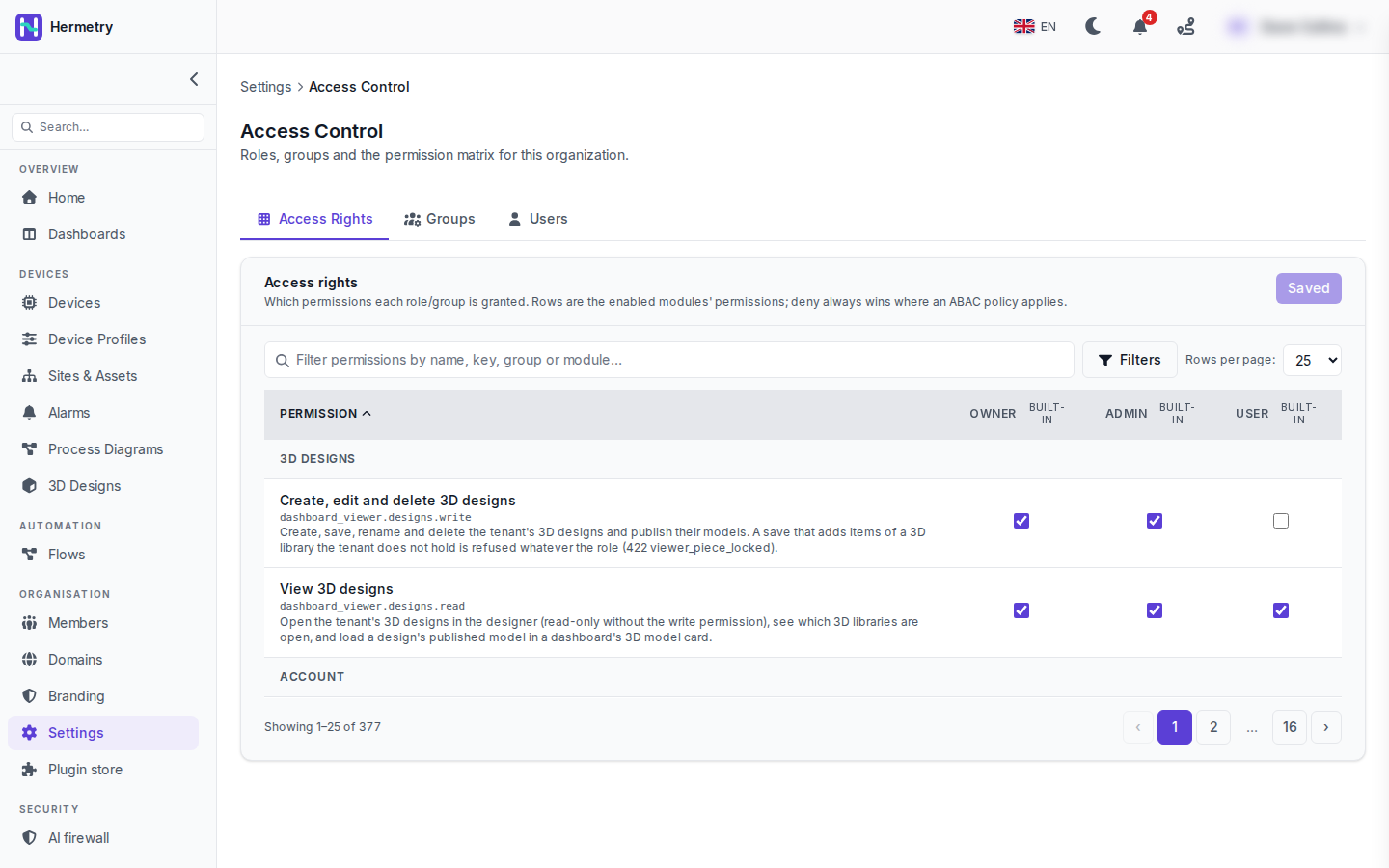
Rows are the permissions of the modules your organisation has, grouped by module. In the screenshot it’s the 3D Designs module with two permissions, each with a label, its key and a description. View 3D designs (dashboard_viewer.designs.read) is ticked for Owner, Admin and User. Create, edit and delete 3D designs (dashboard_viewer.designs.write) is ticked for Owner and Admin, so a User here opens designs read-only.
Read the descriptions, not only the labels. The write one tells you that a save which adds items of a 3D library the organisation doesn’t hold is refused whatever the role, with a 422 viewer_piece_locked.
Columns are the built-in roles, marked built-in, plus one for each of your groups. Tick or untick cells and the button at the top right becomes Save (n), with the number of changes. In the shot it reads Saved because nothing is pending. The Owner column and owner-only permissions can only be changed by an owner.
The filter box searches by name, key, group or module. Typing iot_rpc brings up the command permissions together, quicker than paging through.
Two things to keep in mind. Where an access policy applies, its deny wins over any tick here. And after you add a module, go through its rows: a permission your organisation has no rule for yet shows as Allowed by default, which means members can use it if their role meets its minimum.
To give one person a right without making them Admin, the matrix is usually simpler than a policy: put them in a group and tick the permission in that group’s column. Docs: Groups and permissions.
So for our one designer who is a User, I’d make a group and tick designs.write for it? Or does write need Admin no matter what?
A group works. dashboard_viewer.designs.write has Admin as its minimum role, and a group can lift a member over an Admin minimum. Only Owner minimums are out of reach for groups.
The matrix doesn’t show the minimum role of a permission. Where do I look that up?
In the Permissions reference: every IoT permission with its minimum role and what it allows, plus the platform ones IoT admins meet most. The ids there are the keys you see in the matrix, so you can paste one into the filter.
Added the IoT viewer template on Monday. It shows up as its own column here, handy to see exactly which reads it adds on top of User.
- You must be logged in to reply to this topic.
Join the conversation
Sign in to ask and answer, like helpful posts and mark the reply that solved your problem. Every contribution earns points and levels.