


Alarms
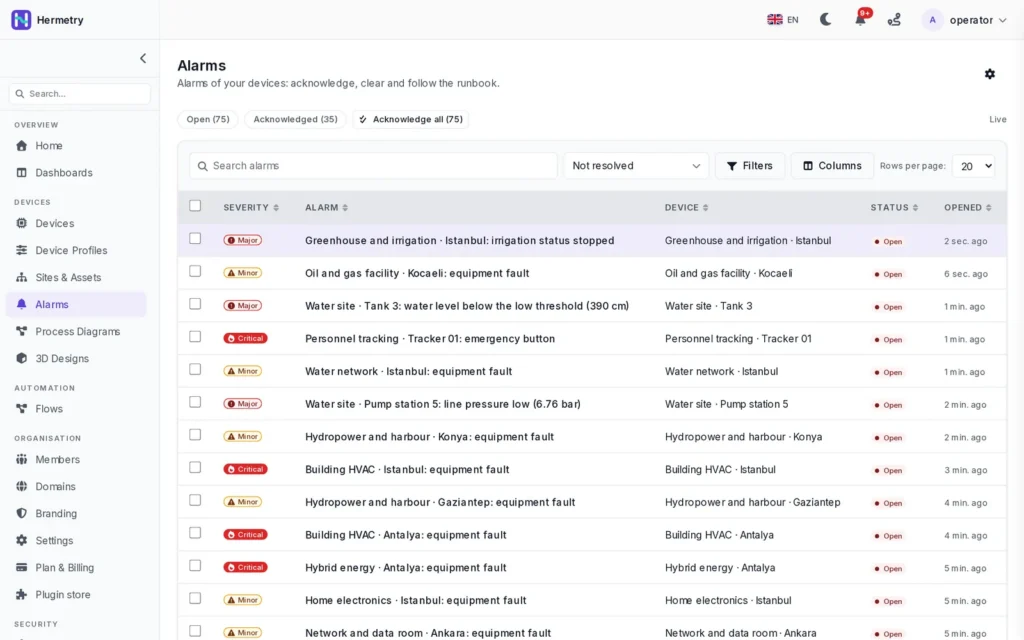
Alarms people can act on
Alarm rules live on the device profile and open an alarm when a condition holds. Each alarm has one of five severities, a runbook and a timeline. Notifications reach the right users, roles or addresses without flooding them.
severities: Critical, Major, Minor, Warning, Info
5
alarm rules per device profile
50
recipients per rule: users, roles or e-mail addresses
20
resolved alarms kept by default
365 days
Lifecycle
Open, acknowledged, resolved
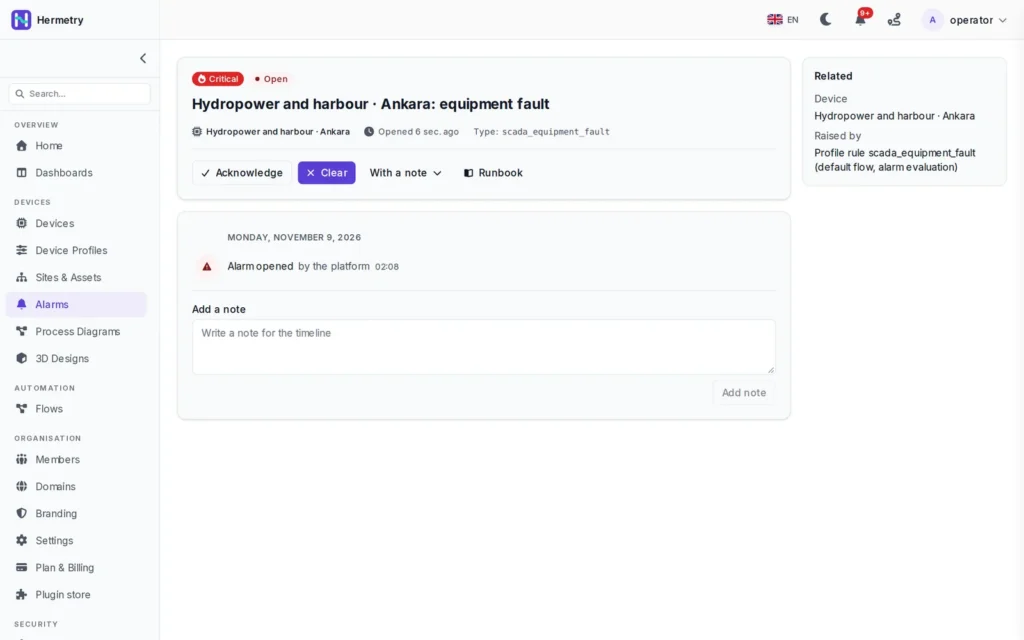
There is one active alarm per device and type: if the condition fires again, the occurrence is counted instead of a second alarm. Severity follows the highest true condition. When the condition clears, the alarm resolves by itself.
- Acknowledge or resolve with an optional note of up to 2,000 characters
- Notes on the timeline, and the rule's runbook beside the alarm
- Acknowledgements and resolutions are audited with the person who made them
- Users acknowledge; administrators resolve by hand, mute devices and edit rules
Alarm rules
What you set on a rule
A rule applies to every device of the profile. Rule changes are versioned and each one is written to the audit log.
| Setting | What it does | Range |
|---|---|---|
| Severities | One condition per severity; the highest true one wins | Critical, Major, Minor, Warning, Info |
| Condition | Compares keys with a number, text, true or false, or a device attribute as a per-device limit; comparisons join with all or any | Up to 16 comparisons |
| Clear condition | When the alarm clears. By default, when no severity condition is true | Optional |
| Debounce | Samples or seconds the condition must hold before the alarm opens or clears. Time counts the device's own time stamps | 1 to 86,400 |
| Hysteresis | A margin on the clear side, so a value hovering at the limit does not flap | Optional |
| Dampening | Holds an alarm that changes too often in a window | 2 to 100 changes |
| Inactivity | Opens an alarm when a device has been silent for a set time | Optional |
| Repeat every | Reminds while the alarm is open and not acknowledged | 60 seconds to 7 days |
| Runbook | Text shown with the alarm: what to check and what to do | Optional |
Channels
Where people hear about alarms
Which channels exist depends on your organisation's setup. Each person's preferences and quiet hours apply; Critical alarms are delivered anyway unless an administrator turns that off.
In the app
The bell in the header and the notification feed, beside the alarm list, the device's Alarms tab and the alarm cards on dashboards.
To the addresses you list on the rule, such as a shift mailbox or a person's address. E-mail is never held back by quiet hours.
SMS
Text messages to phone numbers, sent from a flow when an alarm opens or changes.
Push
In development: browser push, and push to the mobile app that comes with the app.
Chat
The chat and messaging services your organisation has connected.
Webhooks
Every alarm change, without throttling, sent to your own systems as a signed HTTP call.
Without the noise
Who is told, and when
| Alarm change | Notified |
|---|---|
| Opened | Yes, at or above the rule's minimum severity |
| Severity rose | Yes, also when the alarm was already acknowledged |
| Severity fell | No |
| Acknowledged | No |
| Resolved | Yes, if its opening was notified |
| Still open and not acknowledged | A reminder, if the rule repeats |
| Backfilled, or the device is muted | No |
- The same change of the same alarm is notified at most once in 5 minutes
- Above 20 alarm notifications a minute, the rest are collected into a digest every 5 minutes, with a link to the filtered list
- Muting a device for maintenance, for up to 90 days, stops its notifications; its alarms are still recorded and the mute is audited
- Readings that arrive late from a device that was offline are evaluated as backfill and marked Backfilled; nobody is paged for the past
What alarms do not do today
- No on-call rotations or escalation policies for alarms. Use reminders, severity levels and several recipients
- No custom roles as recipients: a rule names users, the built-in Owner, Admin and User roles, or e-mail addresses
- No latching: an alarm resolves when its condition clears, acknowledged or not. Review resolved alarms with an empty Acknowledged column to find the ones nobody saw
- No arithmetic in conditions, such as setpoint plus 10. Store the limit as a device attribute instead
FAQ
Questions about alarms
Can each device have its own limit?
Yes. Use a server or shared attribute such as max_temp as the threshold: all devices share one rule, each with its own limit. If a device has no such attribute, that comparison is false and the device is not checked for that limit. See cold room monitoring for a worked example.
What happens when a device sends old readings after an outage?
They are evaluated as backfill. An alarm that opened and cleared during the outage appears in the history with a Backfilled badge, dated by the readings, and nobody is paged. An alarm still open when the device comes back is announced once.
Can an alarm reach someone at night?
Yes: by e-mail to the addresses on the rule, by SMS from a flow, in linked chat apps and in the app. Critical alarms are delivered even to people who turned that kind of notice off, unless an administrator switches this off. On-call rotations are not available for alarms.
Can other tools receive our alarms?
Yes. Webhooks send alarm.created, alarm.acknowledged and alarm.cleared, signed, in Hermetry's own format or as CloudEvents. See webhooks.
Who may do what with an alarm?
By default, users view and acknowledge alarms; administrators resolve them by hand, mute devices and manage alarm rules. Groups can add permissions on top of a role. See users and roles.
Setting up alarms for a site?
Bring your limits and your on-site routine. We help you turn them into rules that stay quiet until something is wrong.