


Rules and automation
Act on live data, with a switch to stop it
Three tools act on device data: alarm rules on a device profile, rules in a Rules card, and flows. Pick the simplest one that does the job. Every place has a Manual and Auto switch, and flows carry protections against runaway automation.
Three tools
Which tool to use
All three use the same alarms, commands and notifications.
| Alarm rules | Rules card | Flows | |
|---|---|---|---|
| Use it for | Opening an alarm when a value crosses a limit or a device goes silent | When this happens, if that holds, do this, for a site or a device | Any processing you can draw as blocks: transform, enrich, route, call outside systems |
| Where it lives | The device profile, for every device of it | A Rules card on a dashboard, locked to an asset or a device | Automation, on the IoT host or the General host |
| Example | temperature above the device's max_temp for 60 seconds opens a Major alarm | Fan on when the room stays above 28 °C for five minutes during working hours | Turn a meter counter into consumption per hour and store it as a new key |
| Limits | 50 rules per profile, 16 comparisons per condition | 10 triggers, 16 conditions and 20 actions per rule | Versions, a test runner and automatic pause |
| Docs | Alarm rules | The rules engine | Flows |
Writing a rule
When, only if, then
Rules are written in the drawer of a Rules card, without drawing a flow. Each one runs as a flow behind the scenes.
1
When
A value crosses a line or stays there for a time; a device connects, disconnects or goes inactive; an alarm is raised or cleared; a time of day, every N minutes, sunrise or sunset, a date; or a manual run.
2
Only if
Other values, a device's status, an active alarm, a time window, day or night, a date window, your organisation's holiday calendar, or a formula over device values.
3
Then
Send a command, change a device setting, notify users, roles or teams, raise or clear an alarm, wait, wait until something holds, choose between up to five branches, or switch another rule on or off.
Manual and Auto
Stop the automation of a place with one switch
Every asset and device has a mode, and Auto is the default. In Manual, every rule whose home is in that place stops, runs in progress stop at their next step, and no rule from anywhere sends a command or a setting to its devices. A place is in Manual when it, or any asset above it, is.
- Manual until: 30 minutes, 1 hour, 4 hours, a set time or indefinitely; the person who set it is told when Auto returns
- Also runs in Manual: a rule with only notify and alarm actions can keep running, so safety notices still go out
- Switching back to Auto lists the rules whose triggers hold now, and can run them once from the current values
- Every switch is audited and sent as the webhook event
rules.mode_changed
Manual applies to rules in Rules cards. Alarm rules on device profiles are a separate tool.
Limits of a rule
- An action on a kind of device runs once for each such device in the place, up to 200 devices
- A wait lasts at most 24 hours; a stays-so-for timer at most 24 hours, and it survives a restart
- Rules compare with fixed values. Per-device limits belong in alarm rules, which can read a device attribute as the threshold
- A rule that names a deleted device goes to Needs attention and stops until someone edits it
- Rules have their own plan limit and do not count against your flows
Flows
Flows with versions and an emergency stop
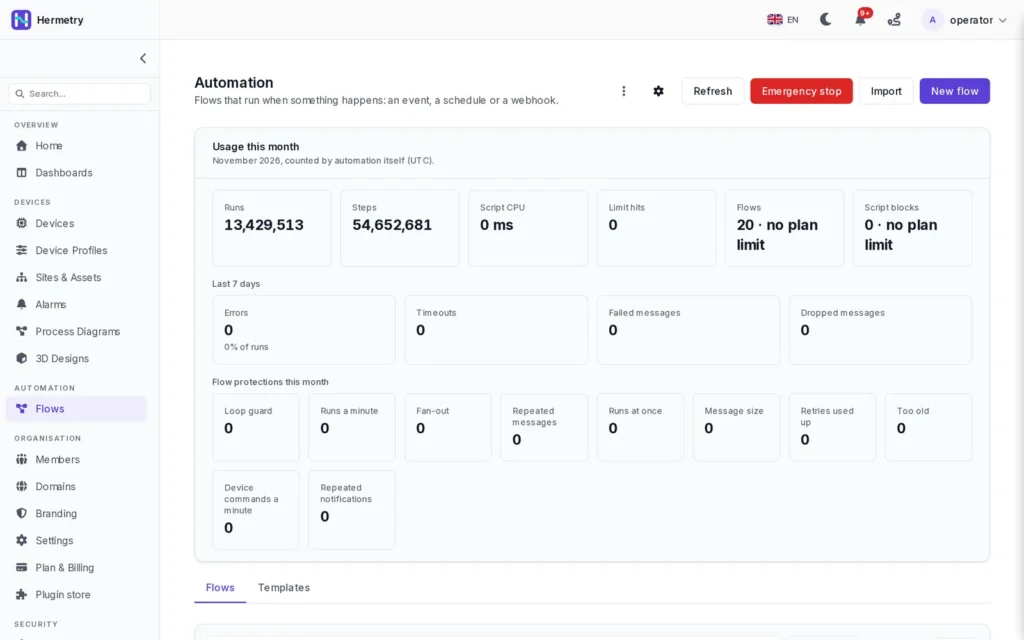
Your organisation's root flow saves telemetry and attributes and runs the alarm rules for every device message. Other flows add any processing you can draw as blocks. Every deploy is a new version you can roll back to.
- A test runner before you deploy
- Automatic pause of a flow that fails or runs too often, with an alert
- Loop detection, per-device command limits and an emergency stop
- Failed messages kept for replay or deletion
Flow blocks
Blocks for the common jobs
Each block has its own help in the editor. Flows export and import as files, and templates give you a start.
Schedules and webhooks
Start a flow daily, on a cron expression, at sunrise or sunset, or when an outside system calls the flow's address.
Counters and statistics
Deltas of a meter counter, with restarts handled; counts in a window; and count, sum, average, minimum, maximum and rate over a number of messages or up to 7 days.
Watchdogs and deadbands
Notice a key that stopped arriving, and pass on only changes larger than a deadband, as a value or a percentage.
Enrich and store
Add the device's fields and attributes, related entities or latest values, and store derived keys as telemetry of the message's device.
Outside systems
HTTP requests with bearer tokens or OAuth2 client credentials, with private addresses blocked; MQTT out to other brokers; e-mail notices with attachments.
Alarms and commands
Raise, clear and acknowledge alarms with the normal lifecycle, and send catalog commands to the message's device.
FAQ
Questions about rules and flows
Do I need to write code?
No. Alarm rules and Rules-card rules are forms. Flows are drawn from blocks; a script block is there for the cases blocks do not cover.
What happens to automation while someone works on site?
Switch the place to Manual. Its rules stop, and no rule sends commands or settings to its devices until it returns to Auto. Notify-only rules marked Also runs in Manual keep working.
Can a rule escalate an alarm that nobody acknowledged?
Not as a rule condition: the active-alarm check does not tell acknowledged from unacknowledged alarms. Use the alarm rule's repeat reminder and its severity levels instead; a rising severity notifies again.
Can each device have its own limit?
In alarm rules, yes: the threshold can be a device attribute such as max_temp. Rules-card rules compare with fixed values, and a rule targets one device or every device of a profile in its place, so use separate profiles when devices must behave differently.
Can flows reach our other systems?
Yes: HTTP requests, MQTT out, and flows started by a webhook call. Signed outgoing webhooks also report device, alarm, command, firmware and rule events.
Automating a site?
Tell us what should happen and when. We show you whether a rule, an alarm or a flow fits, and set up the first one with you.