


AI firewall
A firewall that understands your platform
It listens to every module, scores each person, key and device against its own normal behaviour, and explains every incident it opens in plain words. Today it observes and alerts; carrying out actions is in development.
How it works
From a single event to an explained incident
1
Collect
Modules report security signals: failed and unusual sign-ins, refused permissions, API key failures, role and settings changes, refused device logins, touched decoys.
2
Score
Detectors and rules score each actor (a person, an API key, a device, an address) against its own normal behaviour.
3
Open an incident
When the score is high enough, an incident opens with a severity from Low to Critical, and an alert goes to your security route.
4
Explain
Each incident shows the detectors that held, their evidence and the largest contributions as plain sentences, with the actor's timeline.
Available today
What it does now
Watches every module
It understands actions in sign-in, members, API keys, devices and settings, not only raw HTTP traffic.
Explained incidents
Security incidents, actor by actor, with why they were flagged, a score timeline and the actor's history of the last 7 days.
Decoys
A fake API key, fake record ids and old admin paths that nobody legitimate uses. Touching one raises a critical signal about the caller.
Your verdicts count
Acknowledge, resolve or mark a false alarm. Your verdicts tune the thresholds for your organisation.
Retention you set
Security events and closed incidents are kept 7 to 365 days (90 by default) and deleted every night after that.
The usual controls stay on
Lockouts after failed sign-ins, address bans, two-step sign-in and API key limits work as before, whatever the firewall's mode.
Modes
How it will act, one action at a time
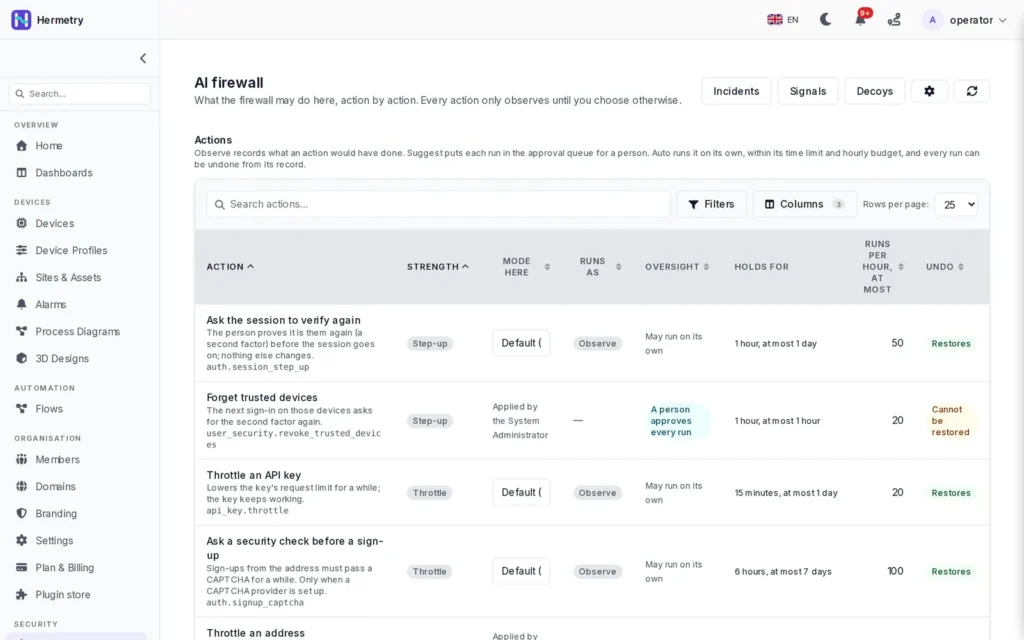
You already choose a mode for each action the firewall could take. Carrying out Suggest and Auto is in development; until then every mode records what would have happened.
| Mode | What it means | Status |
|---|---|---|
| Observe | Records what the action would have done. The default for every action. | Available |
| Suggest | Each run waits for a person to approve it. | In development |
| Auto | Runs on its own within a time limit and an hourly budget, and can be undone. Switching to Auto asks for confirmation. | In development |
FAQ
Questions about the AI firewall
Does it block anything today?
Not by itself. Today it observes, opens incidents and alerts your team. Blocking comes from the platform's ordinary controls, such as lockouts after failed sign-ins and address bans, which work whatever the firewall does.
Can it switch off my equipment?
Not today: carrying out actions is in development. When it arrives, actions on devices start as suggestions a person approves; disabling a device can run on its own only if an administrator sets that action to Auto.
Does it use our personal data to learn?
Counters and baselines use keyed hashes, not names, and incident explanations hold feature names and numbers only. Addresses are kept with the events and deleted with the retention you set.
Does it use machine-learning models?
Detectors and rules score every actor today. Two independent models are part of the design; they are trained and validated before they may influence a decision, and none is switched on yet.
Who can see what it found?
Administrators see the incidents about their own organisation's people, keys and devices. Platform-wide views are limited to the platform operator.
See it on your own traffic
Book a demo and we show the incidents and explanations the firewall writes for a real organisation.