


Platform
One platform from the field device to the control room
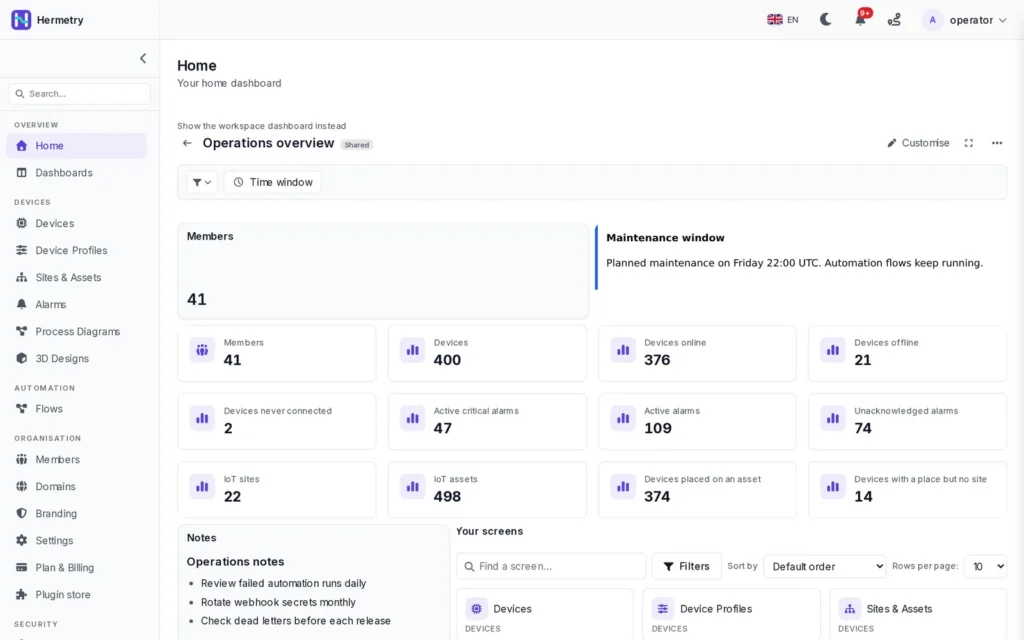
Hermetry connects devices over MQTT, HTTPS, LoRaWAN or SNMP polling, stores their readings, shows them on dashboards and SCADA screens, and acts on them with alarms, rules and flows. Every part works on the same data, in one organisation, in the region you choose.
ways in: MQTT, HTTPS, LoRaWAN and SNMP polling
4
alarm severities, from Critical to Info
5
longest telemetry retention class
1,095 days
hosting regions: EU, US and Türkiye
3
How a reading travels
From one message to an alarm on a screen
The same path for every device, whatever protocol it speaks.
1
Arrive
The device sends over MQTT, HTTPS or LoRaWAN, or the platform polls it. Its device profile checks the login, the allowed networks and the rate limits.
2
Store
Your organisation's root flow saves telemetry and attributes. Readings are kept for your plan's retention class, with minute, hourly and daily summaries.
3
Evaluate
The root flow runs the alarm rules of the device's profile. Rules in Rules cards and other flows that watch the value run next.
4
Show and tell
Dashboards, SCADA drawings and the alarm list update live. Notifications go to people, and signed webhooks go to your other systems.
Sites and assets
Every device has a place
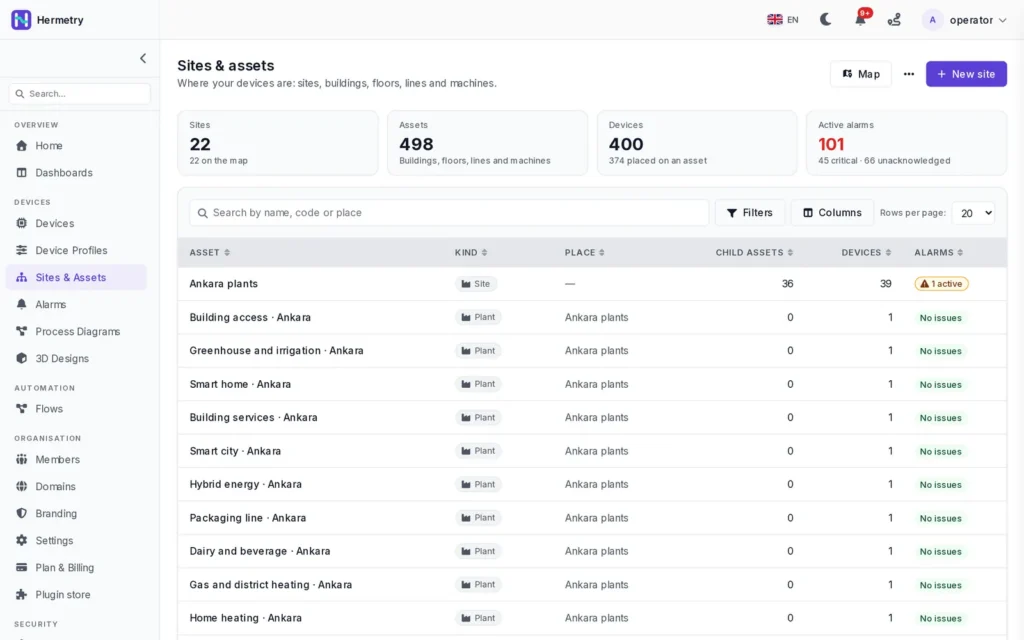
A tree of sites, buildings, floors, rooms, lines and machines ties the platform together. A device's place decides which site's status and alarm counts include it, which rules of a place may act on it, and which devices a site's boards offer first.
- Built-in kinds plus your own, such as Plant, Zone or Depot
- Location, time zone and attributes on every asset
- Relations such as Feeds and Monitors beside the tree
- How the asset hierarchy works
Alarms
One list of what is wrong, everywhere
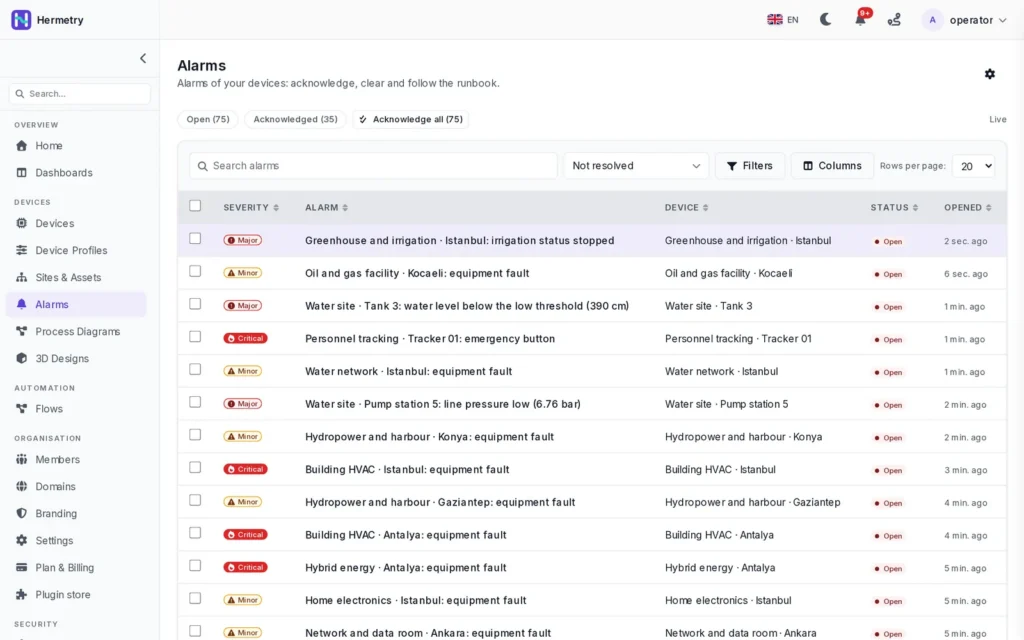
Alarm rules on device profiles open alarms with a severity, a runbook and a timeline. Operators acknowledge them and add notes; an alarm resolves by itself when its condition clears.
- Filter by severity, status, device and time
- The same alarms on dashboards, sites and the bell
- Notifications in the app, by e-mail, SMS and chat, with flood protection
- More about alarms
Explore
Everything works together
Each part of the platform plugs into the others.
Choose the right tool
Which part does what
Pick the simplest tool that does the job. They all share the same devices, alarms, commands and notifications.
| You want to | Use | Read more |
|---|---|---|
| Set how a kind of device logs in, how fast it may send and when it counts as online | A device profile | Device profiles |
| Open an alarm when a value crosses a limit or a device goes silent | An alarm rule on the profile | Alarm rules |
| Switch a fan on when a room stays hot for five minutes during working hours | A rule in a Rules card | The rules engine |
| Transform, enrich or route messages, or call another system | A flow | Flows |
| Watch values, trends and alarms of many sites | A dashboard | Dashboards |
| Draw the process with pumps, tanks, valves and pipes | A SCADA drawing or a 3D design | SCADA |
| Tell another system that a device, alarm or command changed | A webhook | Webhooks |
| Update firmware on many devices | An OTA rollout | Firmware updates |
FAQ
Common questions
Do I need to install anything?
Not for the hosted service: Hermetry runs in the browser, in the EU, US or Türkiye region. Sites whose field devices cannot reach the internet use a licensed gateway running Hermetry Edge. On-premises installation is part of the Enterprise plan; see deployment.
Which devices can connect?
Devices that speak MQTT 3.1.1 or HTTPS, LoRaWAN devices through Hermetry's own network server, SNMP equipment polled from the cloud, and field devices behind a gateway. Licensed devices add one-step claiming, remote settings and signed firmware. See devices and connectivity.
How long is data kept?
Your plan sets one retention class for the organisation: 7, 30, 90, 365 or 1,095 days. Raw readings are kept for at most 90 days; hourly and daily summaries are kept for the whole class. See dashboards for the full table.
What happens if we send more messages than the plan includes?
You are warned at 80 % and at 100 % of the monthly allowance. Going over does not stop your devices. Telemetry and attribute messages count; commands, alarms and connection events do not.
Can our other systems read the data?
Yes. The REST API serves devices, telemetry series and attributes, with API keys limited to the permissions you choose. Signed webhooks report device, alarm, command, firmware and rule events. See the API docs.
Is there a mobile app?
Not yet. The mobile app is in development. Today, use the web app in a browser.
See your own devices on Hermetry
Start a trial in your region, or book a demo and bring the devices and sites you want to connect.