


Where am I signed in? The Active Sessions list on My Profile > Security
The Security tab of your own profile is easy to overlook, so here is what’s on it and when I use it.
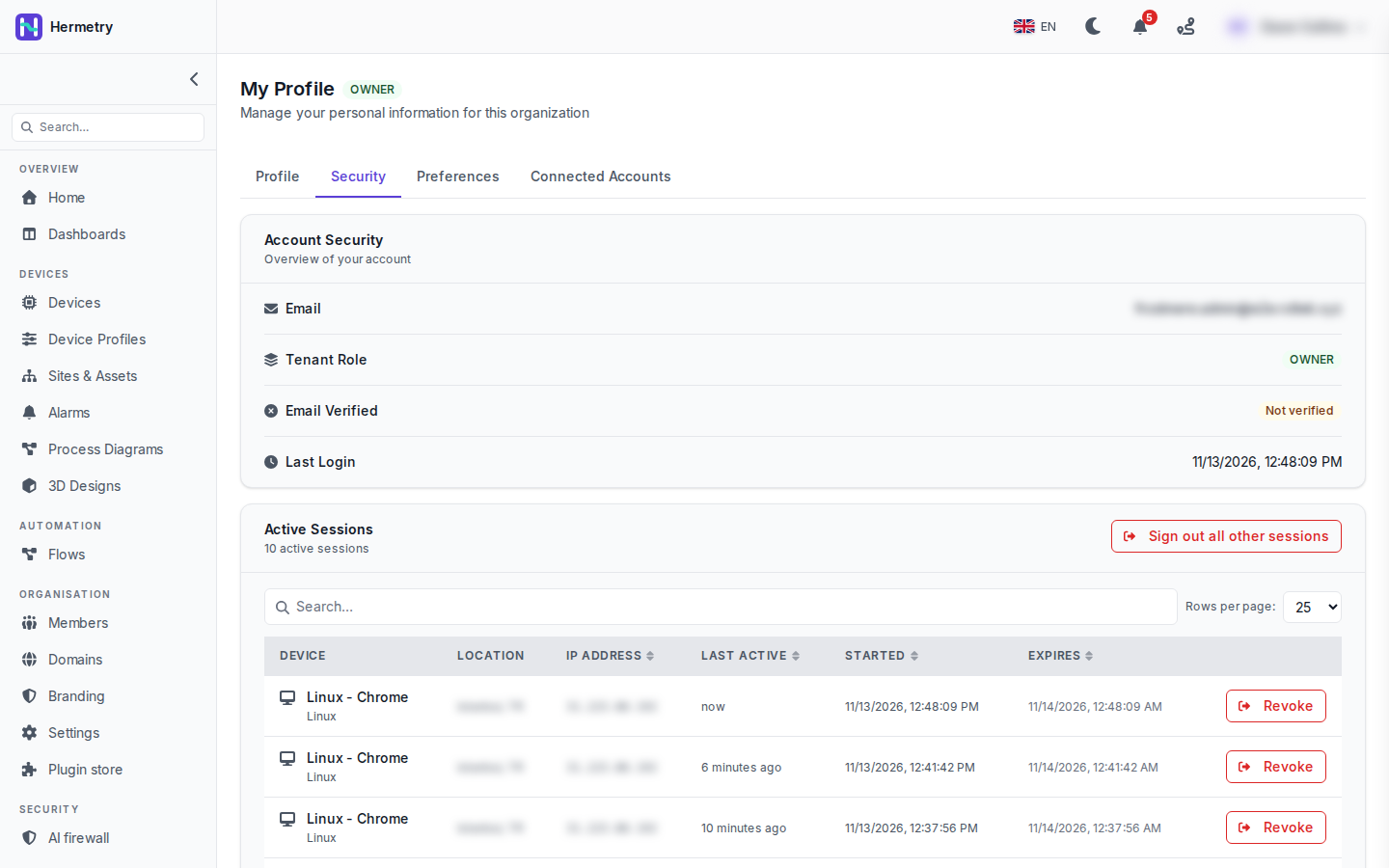
The top card, Account Security, is an overview: your e-mail, your role in this organisation, whether the e-mail is verified, and your last login. This is a test account, so ignore the Not verified.
Below it, Active Sessions lists where you are signed in, with the device and browser, location, IP address, last active, started and expires (location and IP are blurred in the shot). Each row has Revoke. Sessions of your other organisations, if you have any, are marked Other organization. Sign out all other sessions at the top ends every session except the one you’re using.
The counter here says 10 active sessions. For reference, one person can have at most 10 live sessions in one organisation; signing in on one more ends the oldest. Signing in again in the same browser replaces that browser’s session instead of adding one.
Every session also ends after a period of inactivity and after an absolute lifetime, and that lifetime is longer when you tick remember me at sign-in.
When I open it: after signing in on a machine that isn’t mine, when a laptop goes missing, or when I see a location or browser I can’t place. If you find one you can’t explain, revoke it, sign out the others and change your password.
Useful. As an admin, what can I do about other people’s sessions? We have two shared PCs in the control room and I never know who is still signed in on them.
From Members, open the person and use Sign out: they are signed out of the organisation on every device at once. They can sign in again, so if you want to keep them out, suspend them instead. Every sign-in and sign-out is in the audit log, so filtering on auth.login and auth.logout tells you who used the organisation and from where.
For the shared PCs: tell people not to tick remember me there, and to sign out when they leave.
When I hit Revoke on a row, is that session dead immediately, or does it live until its access token runs out?
Immediately. The device using that session is signed out at once, and if it’s the one you’re on, you’re signed out too.
TIL about the limit of 10. Our lab has 12 Raspberry Pis running a kiosk browser, all signed in with the same account, and they keep kicking each other out. Now I know why lol
That’s the oldest session being ended each time a Pi signs in. Give each screen its own account if your plan’s seats allow it. Then the sessions stop fighting, and the audit log shows which screen did what instead of 12 identical actors. If the screens only show a board, look at display links instead: a display link shows a shared board on a screen where nobody signs in.
- You must be logged in to reply to this topic.
Join the conversation
Sign in to ask and answer, like helpful posts and mark the reply that solved your problem. Every contribution earns points and levels.