


Access groups for a plant team, starting from the Groups tab
Since 2.0.1 you can make your own access groups. This is the Groups tab of Settings > Access Control on a test organisation, before I add anything.
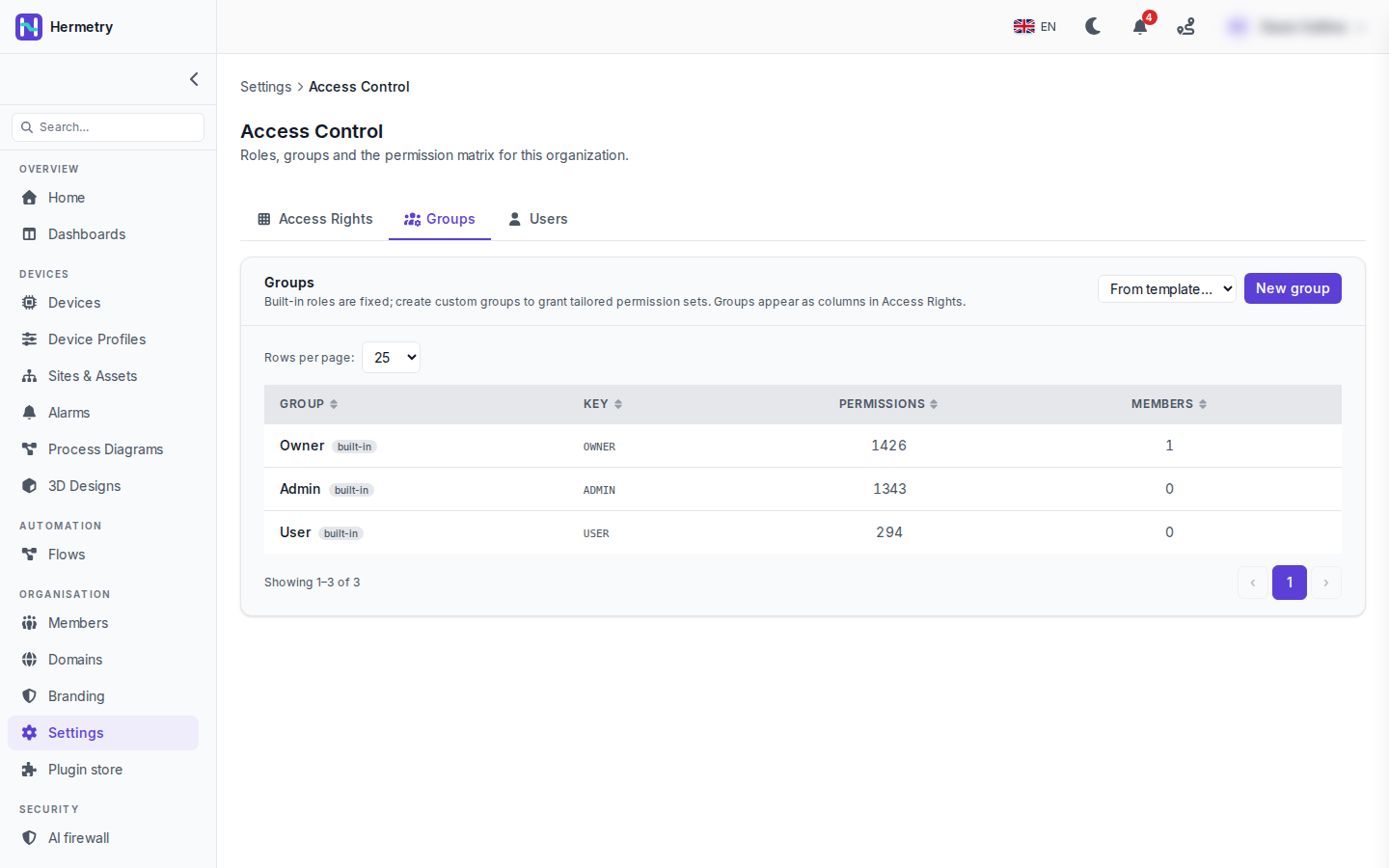
The built-in roles appear here as groups, each with its key, the number of permissions it holds and its members: Owner (OWNER) with 1426, Admin (ADMIN) with 1343 and User (USER) with 294. The organisation has one member, the owner. The built-in roles are fixed. Their numbers depend on the modules your plan has, since a module you don’t have adds no permissions.
Now a plant team. Say the operators of one plant need to edit devices and write attributes, but must not see device credentials or touch settings. Making them Admin hands them all of that and much more. Instead:
- New group. Key
plant.north.operators, label “North plant operators”. The key can’t be changed later and it shows up in the audit log and in access policies, so name it properly. - Create, open the group, and tick its permissions. For this case
iot_device.devices.updateandiot_device.attributes.write, on top of what User already has. - On the Users tab, leave them as User and add the group.
Groups only add permissions to the role; they never take one away. A group can lift a member over an Admin minimum, never over an Owner one, so raw commands, firmware signing keys and ownership transfer stay with owners whatever a group says.
The Active switch on a group is handy: an inactive group keeps its members but grants nothing. From template… next to New group adds a ready-made group that you can then edit like any other.
Check the result per person on their member page, Permissions tab, which shows effective access. Docs: Groups and permissions.
And the other direction? We have contractors at User level who should not send any commands at all. If groups only add, how do I take that away from them?
Two ways.
If no User should send commands, untick iot_rpc.send.basic for User on the Access Rights tab.
If it’s only the contractors, put them in a group (key contractors, say) and add a Deny access policy: actions iot_rpc.send.basic, iot_rpc.send.privileged and iot_device.attributes.write, condition subject.roles contains contractors. A deny wins over any permit. Policies need the Owner role. Turn on shadow mode first and watch the decision log for a few days before you enforce it.
Can a group be limited to one plant’s devices? So the north operators only see north devices?
No. Groups and policies decide on the action, and IoT pages pass no device attributes to policies, so a member who may view devices sees all devices of the organisation. If the north plant must never see the south plant’s devices, they belong in two organisations. One account can be a member of both, with a different role in each.
Did an operators group like this for our packaging line. The Permissions tab on the member page caught a mistake for me, I had ticked attributes write and forgotten devices update, so they could change attributes but not rename a device.
- You must be logged in to reply to this topic.
Join the conversation
Sign in to ask and answer, like helpful posts and mark the reply that solved your problem. Every contribution earns points and levels.