


Reading the audit log: who did what, and checking nobody edited it
The audit log lives at /admin/audit-logs and needs the Admin role or higher. Here it is unfiltered on a test organisation, a minute after I signed in, newest first.
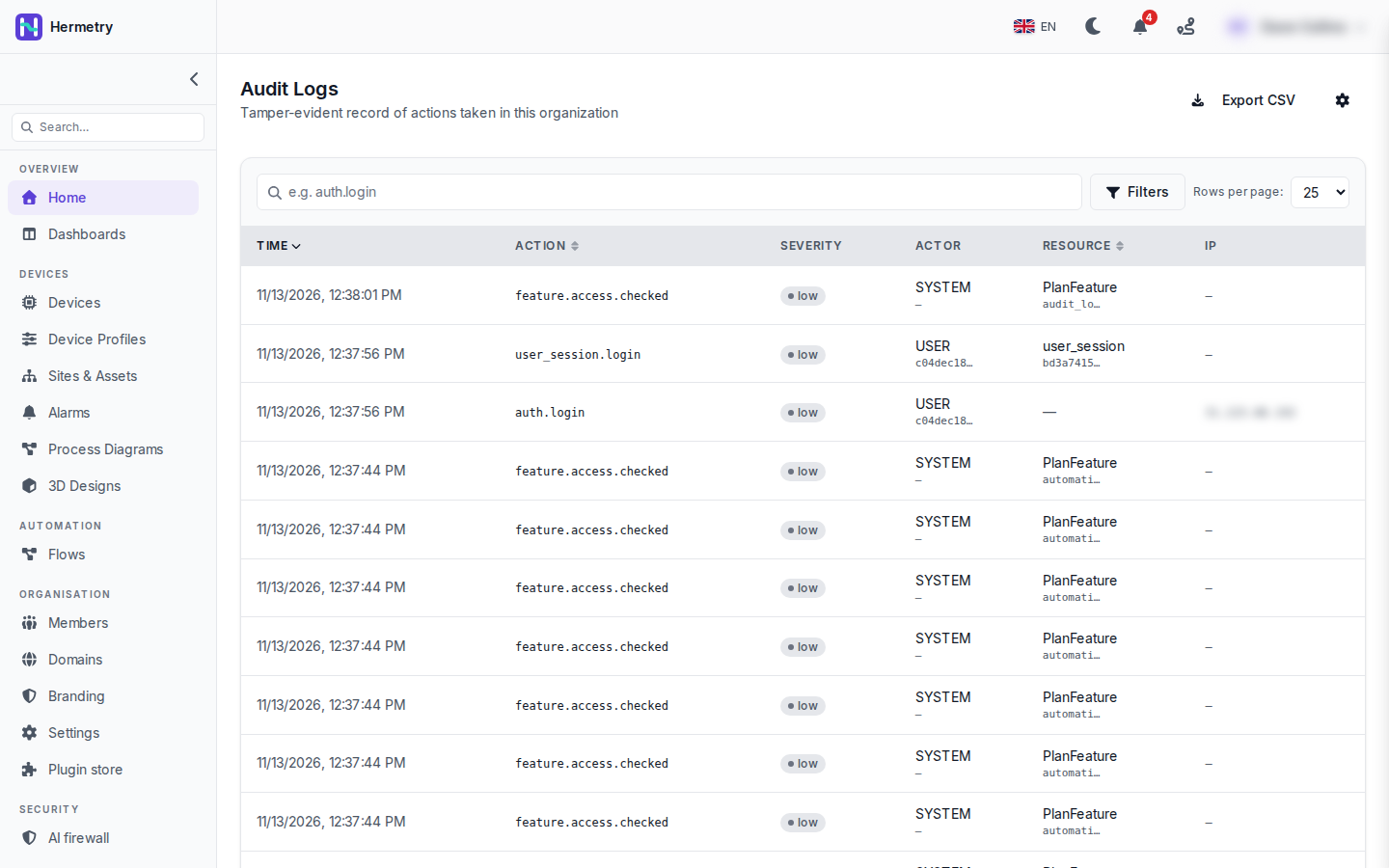
Each row has the time, the action, its severity, the actor and the resource, and the IP where a request came in. My sign-in is the two rows auth.login and user_session.login, with USER as the actor. The rest are feature.access.checked rows, written by SYSTEM, with a PlanFeature as the resource. Select any row for Audit Log Detail: actor type and ID, metadata, and the hash chain fields.
On a busy organisation you’ll want to filter. The search box takes part of an action name: iot_device.credential finds every credential change, auth.login finds sign-ins and failures. Filters adds actor (by e-mail), severity and a date range. For a daily look I filter on High and Critical.
For one device, the API takes a resource type and id:
GET /tenant/{tenantId}/api/audit-logs?resourceType=iot_device&resourceId=<deviceId>&fromDate=2026-10-01&toDate=2026-10-20&page=1&pageSize=100The page calls itself tamper-evident. Each row’s hash covers its content and the previous row’s hash, so editing or deleting a kept row breaks the chain. You can check it whenever you like:
GET /tenant/{tenantId}/api/audit-logs/verifyIt answers { "ok": true, "checked": <rows> }, or "ok": false with brokenAt naming the first row that doesn’t fit.
Retention sits behind the gear icon (Audit Log Settings). The default is 0, which keeps rows forever. Export CSV downloads the date range of your filter. Passwords, tokens, keys and other secrets are never written to a row.
Docs: Audit log, What is audited.
Those feature.access.checked rows would bury everything on our org. Can I hide them from the list?
Search for the action you’re after instead of scrolling, or filter by severity: the ones in the shot are all Low, so a High or Critical filter leaves them out.
We’d rather push high severity events into our SIEM than poll the API. Any hook for that?
Yes, high and critical rows fire the audit.high_risk webhook, so you can forward them as they happen. For bulk pulls the export endpoint does CSV or NDJSON and can be limited to one actor:
GET /tenant/{tenantId}/api/audit-logs/export?format=ndjson&fromDate=2026-10-01&toDate=2026-10-21Since 2.2.0 the device page has a Log tab. Same data as the resourceType query above?
Not only. The Log tab shows the device’s audited changes, each by a person or by the system, together with its connection history (connects, disconnects, refused logins) in one timeline; Show switches between All, Connections and Changes. For a single device it’s quicker than the API call. I wrote the post two days before it shipped.
- You must be logged in to reply to this topic.
Join the conversation
Sign in to ask and answer, like helpful posts and mark the reply that solved your problem. Every contribution earns points and levels.