


Leer el registro de auditoría: quién hizo qué y comprobar que nadie lo editó
Traducido del English por IA ·
El registro de auditoría está en /admin/audit-logs y requiere el rol Admin o superior. Aquí se muestra sin filtrar en una organización de prueba, un minuto después de iniciar sesión, del más reciente al más antiguo.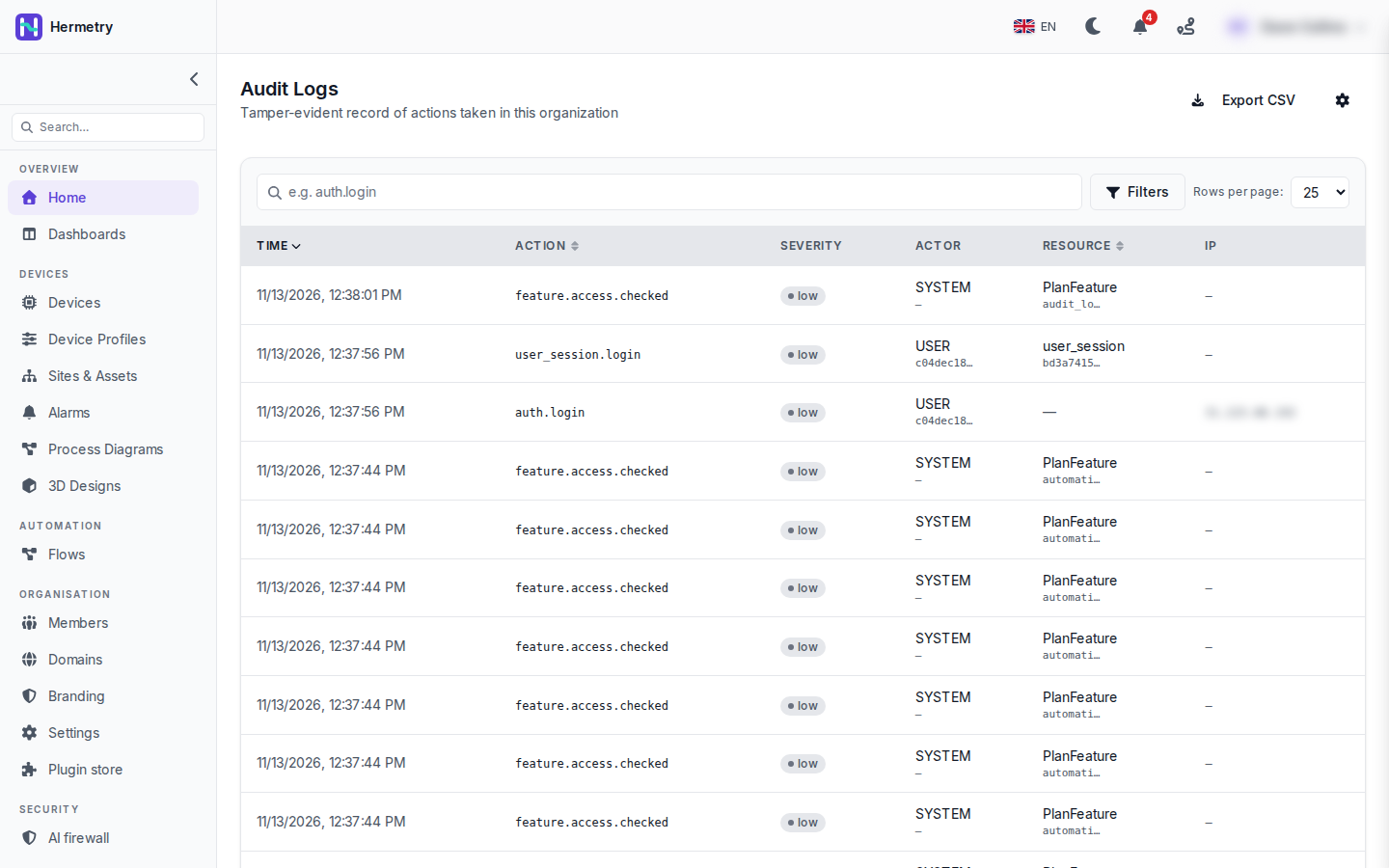 Cada fila tiene la hora, la acción, su gravedad, el actor y el recurso, y la IP desde la que llegó una solicitud. Mi inicio de sesión son las dos filas
auth.login y user_session.login, con USER como actor. El resto son filas feature.access.checked, escritas por SYSTEM, con un PlanFeature como recurso. Seleccione cualquier fila para abrir Audit Log Detail: tipo e ID del actor, metadatos y los campos de la cadena de hash.En una organización muy activa conviene filtrar. El cuadro de búsqueda acepta parte del nombre de una acción: iot_device.credential encuentra todos los cambios de credenciales, auth.login encuentra los inicios de sesión y los fallos. Filters añade actor (por correo electrónico), gravedad y un rango de fechas. Para una revisión diaria, filtro por High y Critical.Para un dispositivo concreto, la API acepta un tipo de recurso y un id:
GET /tenant/{tenantId}/api/audit-logs?resourceType=iot_device&resourceId=<deviceId>&fromDate=2026-10-01&toDate=2026-10-20&page=1&pageSize=100La página se describe a sí misma como a prueba de manipulaciones. El hash de cada fila cubre su contenido y el hash de la fila anterior, así que editar o eliminar una fila conservada rompe la cadena. Puede comprobarlo cuando quiera:
GET /tenant/{tenantId}/api/audit-logs/verifyResponde { "ok": true, "checked": <rows> }, o "ok": false con brokenAt indicando la primera fila que no encaja.La retención está detrás del icono de engranaje (Audit Log Settings). El valor predeterminado es 0, que conserva las filas para siempre. Export CSV descarga el rango de fechas de su filtro. Las contraseñas, tokens, claves y otros secretos nunca se escriben en una fila.Documentación: Registro de auditoría, Qué se audita.
The audit log lives at /admin/audit-logs and needs the Admin role or higher. Here it is unfiltered on a test organisation, a minute after I signed in, newest first.
Each row has the time, the action, its severity, the actor and the resource, and the IP where a request came in. My sign-in is the two rows auth.login and user_session.login, with USER as the actor. The rest are feature.access.checked rows, written by SYSTEM, with a PlanFeature as the resource. Select any row for Audit Log Detail: actor type and ID, metadata, and the hash chain fields.
On a busy organisation you’ll want to filter. The search box takes part of an action name: iot_device.credential finds every credential change, auth.login finds sign-ins and failures. Filters adds actor (by e-mail), severity and a date range. For a daily look I filter on High and Critical.
For one device, the API takes a resource type and id:
GET /tenant/{tenantId}/api/audit-logs?resourceType=iot_device&resourceId=<deviceId>&fromDate=2026-10-01&toDate=2026-10-20&page=1&pageSize=100The page calls itself tamper-evident. Each row’s hash covers its content and the previous row’s hash, so editing or deleting a kept row breaks the chain. You can check it whenever you like:
GET /tenant/{tenantId}/api/audit-logs/verifyIt answers { "ok": true, "checked": <rows> }, or "ok": false with brokenAt naming the first row that doesn’t fit.
Retention sits behind the gear icon (Audit Log Settings). The default is 0, which keeps rows forever. Export CSV downloads the date range of your filter. Passwords, tokens, keys and other secrets are never written to a row.
Docs: Audit log, What is audited.
Traducido del English por IA ·
Esas filas feature.access.checked taparían todo en nuestra organización. ¿Puedo ocultarlas de la lista?
Those feature.access.checked rows would bury everything on our org. Can I hide them from the list?
Traducido del English por IA ·
Busque la acción que le interesa en lugar de desplazarse, o filtre por gravedad: las que aparecen en la captura son todas Low, así que un filtro de High o Critical las deja fuera.
Search for the action you’re after instead of scrolling, or filter by severity: the ones in the shot are all Low, so a High or Critical filter leaves them out.
Traducido del English por IA ·
Preferiríamos enviar los eventos de alta severidad a nuestro SIEM en lugar de consultar la API. ¿Hay algún hook para eso?
We’d rather push high severity events into our SIEM than poll the API. Any hook for that?
Traducido del English por IA ·
Sí, las filas de riesgo alto y crítico activan el webhook audit.high_risk, así que puedes reenviarlas en cuanto ocurren. Para las descargas masivas, el endpoint de exportación admite CSV o NDJSON y puede limitarse a un único actor:
GET /tenant/{tenantId}/api/audit-logs/export?format=ndjson&fromDate=2026-10-01&toDate=2026-10-21Yes, high and critical rows fire the audit.high_risk webhook, so you can forward them as they happen. For bulk pulls the export endpoint does CSV or NDJSON and can be limited to one actor:
GET /tenant/{tenantId}/api/audit-logs/export?format=ndjson&fromDate=2026-10-01&toDate=2026-10-21Traducido del English por IA ·
Desde la versión 2.2.0, la página del dispositivo tiene una pestaña Log. ¿Son los mismos datos que la consulta resourceType de arriba?
Since 2.2.0 the device page has a Log tab. Same data as the resourceType query above?
Traducido del English por IA ·
No solo eso. La pestaña Log muestra los cambios auditados del dispositivo, cada uno realizado por una persona o por el sistema, junto con su historial de conexiones (conexiones, desconexiones, inicios de sesión rechazados) en una sola línea de tiempo; Show alterna entre All, Connections y Changes. Para un solo dispositivo es más rápido que la llamada a la API. Escribí la entrada dos días antes de que se publicara.
Not only. The Log tab shows the device’s audited changes, each by a person or by the system, together with its connection history (connects, disconnects, refused logins) in one timeline; Show switches between All, Connections and Changes. For a single device it’s quicker than the API call. I wrote the post two days before it shipped.
- Debes estar registrado para responder a este debate.
Únete a la conversación
Inicia sesión para preguntar y responder, dar me gusta a las publicaciones útiles y marcar la respuesta que resolvió tu problema. Cada aportación suma puntos y niveles.