


L'onglet Commands sur un contrôleur neuf, avant la première commande
Traduit de English par IA ·
Depuis la 2.2.0, la page de l’appareil comporte un onglet Commands. C’est l’onglet de notre espace de test avant que quiconque ait envoyé quoi que ce soit : contrôleur CL1, « Collector line 1 PLC (check-in island A) », en ligne, profil Collector controller, firmware 26.10.0-sim, MQTT.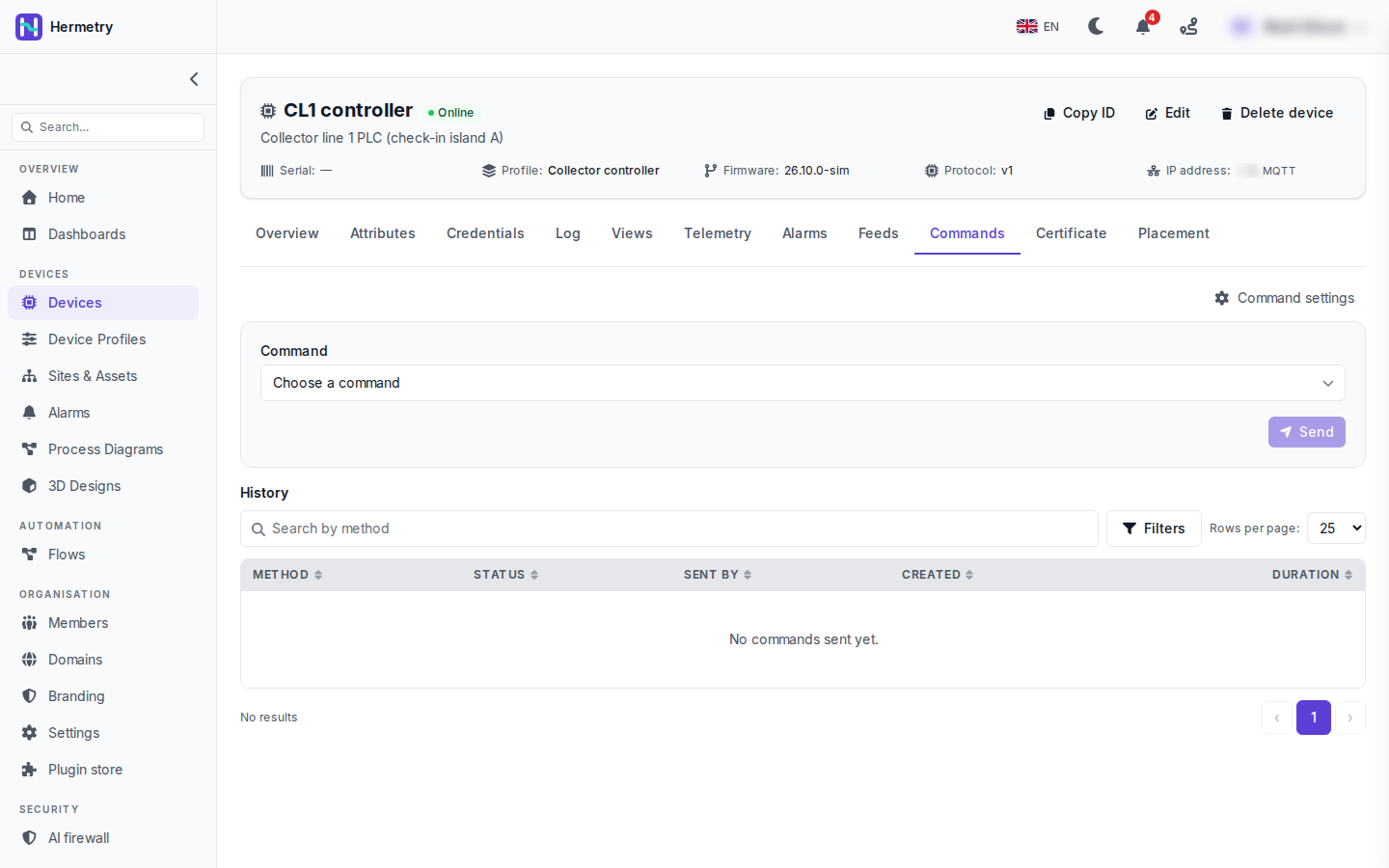 Partie haute : Choose a command et Send. Send est grisé sur la capture, aucune commande n’étant encore choisie. La liste provient du catalogue de commandes du profil de l’appareil (profil, onglet Commands, Add command).Une fois une commande choisie, ses paramètres apparaissent, avec quelques options : one-way, le délai de réponse, la livraison au retour de l’appareil (persistent) et la durée pendant laquelle une commande en file d’attente attend avant d’être abandonnée. Une commande marquée à fort impact demande une confirmation, parfois en saisissant une phrase.La partie basse est l’historique (History) : Method, Status, Sent by, Created et Duration, avec une recherche par méthode et des filtres. Ici, il est écrit « No commands sent yet. » Sent by est la colonne que je trouve la plus utile. Elle indique si la commande vient de la console, de l’API, d’un flux, d’une mise à jour du firmware, d’une action d’alarme ou d’une commande de tableau de bord. Ouvrir une ligne affiche la requête, la réponse et la progression.Sending commands to devices présente la liste complète des états.
Since 2.2.0 the device page has a Commands tab. This is the tab on our test workspace before anyone has sent anything: CL1 controller, « Collector line 1 PLC (check-in island A) », online, profile Collector controller, firmware 26.10.0-sim, MQTT.
Top half: Choose a command and Send. Send is greyed out in the shot, with no command picked yet. The list comes from the command catalog on the device’s profile (profile, Commands tab, Add command).
Once you pick one, its parameters appear, and there are a few options: one-way, the answer timeout, deliver when the device comes back (persistent) and how long a queued command waits before it’s given up. A command marked high impact asks you to confirm, sometimes with a phrase to type.
Bottom half is the History: Method, Status, Sent by, Created and Duration, with a search by method and filters. Here it says « No commands sent yet. » Sent by is the column I find most useful. It tells you whether the command came from the console, the API, a flow, a firmware update, an alarm action or a dashboard control. Opening a row shows the request, the response and the progress.
Sending commands to devices has the full list of states.
Traduit de English par IA ·
Qui peut envoyer quoi ici ? Nos opérateurs sont tous des Users.
Who can send what here? Our operators are all Users.
Traduit de English par IA ·
Chaque commande du catalogue a un niveau. Par défaut, Basic est réservé aux Users, Privileged et Critical aux administrateurs, et une méthode raw absente du catalogue est réservée aux owners. Si un opérateur a besoin de commandes privileged, un groupe personnalisé avec iot_rpc.send.privileged suffit, sans en faire un Admin.
Each command in the catalog has a tier. By default Basic is for Users, Privileged and Critical for administrators, and a raw method that isn’t in the catalog is owners only. If one operator needs privileged commands, a custom group with iot_rpc.send.privileged does it without making them Admin.
Traduit de English par IA ·
Que reçoit réellement l’appareil ? J’écris la partie automate la semaine prochaine.
What does the device actually receive? Writing the PLC side next week.
Traduit de English par IA ·
Il s’abonne à v1/rpc/req/+ et récupère la method et les params ; pour une commande bidirectionnelle, il répond avec le même id :
PUBLISH v1/rpc/req/42
{"method": "sys.ping", "params": {"host": "8.8.8.8", "count": 3}}

PUBLISH v1/rpc/res/42
{"ok": true, "result": {"sent": 3, "received": 3, "avg_ms": 18.2}}
Les commandes ne sont livrées qu’une fois que l’appareil s’est abonné sur cette connexion.
It subscribes to v1/rpc/req/+ and gets the method and params; for a two-way command it answers on the same id:
PUBLISH v1/rpc/req/42
{"method": "sys.ping", "params": {"host": "8.8.8.8", "count": 3}}

PUBLISH v1/rpc/res/42
{"ok": true, "result": {"sent": 3, "received": 3, "avg_ms": 18.2}}
Commands are only delivered after the device has subscribed on that connection.
Traduit de English par IA ·
Pour celui qui écrit le firmware : dédupliquez sur l’identifiant de requête. Une commande peut arriver deux fois. Conservez les 32 derniers identifiants pendant dix minutes et ignorez les répétitions. Je l’ai découvert avec une commande de redémarrage.
For whoever writes the firmware: dedupe on the request id. A command can arrive twice. Keep the last 32 ids for ten minutes and skip repeats. Learned that with a reboot command.
Traduit de English par IA ·
Notre automate de test répond à sys.ping, l’historique affiche Successful ainsi que la durée. Il m’a fallu une heure pour comprendre qu’il faut se réabonner après chaque reconnexion, je ne le faisais qu’une seule fois au démarrage.
Got our test PLC answering sys.ping, history shows Successful and the duration. Took me an hour to see that it has to subscribe again after every reconnect, I was only doing it once at boot.
- Vous devez être connecté pour répondre à ce sujet.
Rejoignez la discussion
Connectez-vous pour poser et répondre à des questions, aimer les messages utiles et marquer la réponse qui a résolu votre problème. Chaque contribution rapporte des points et des niveaux.