


La pestaña Commands en un controlador nuevo, antes del primer comando
Traducido del English por IA ·
Desde la 2.2.0, la página del dispositivo tiene una pestaña Commands. Esta es la pestaña en nuestro espacio de pruebas antes de que nadie haya enviado nada: controlador CL1, «Collector line 1 PLC (check-in island A)», en línea, perfil Collector controller, firmware 26.10.0-sim, MQTT.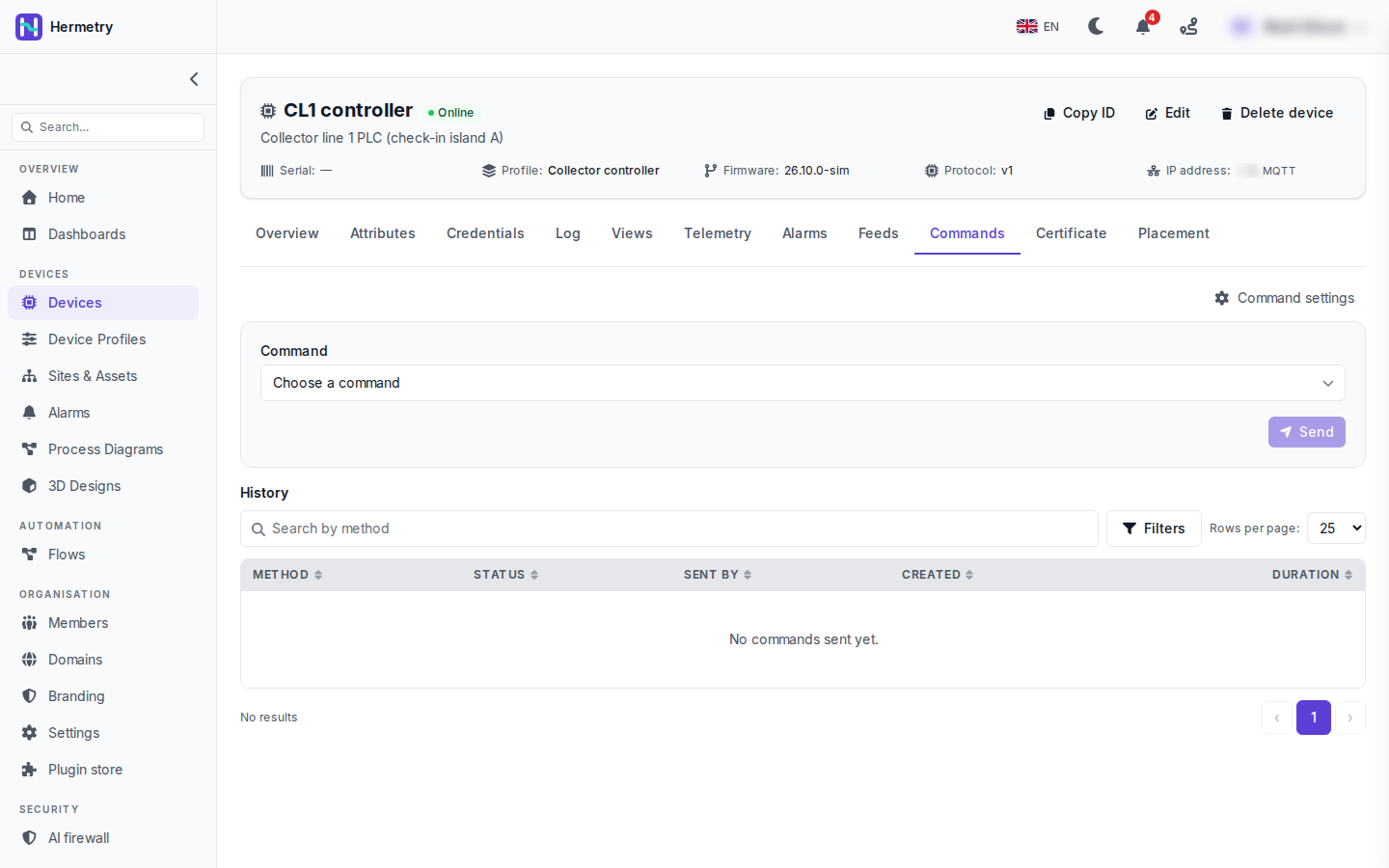 Mitad superior: Choose a command y Send. Send aparece en gris en la captura, porque todavía no se ha elegido ningún comando. La lista procede del catálogo de comandos del perfil del dispositivo (perfil, pestaña Commands, Add command).Cuando eliges uno, aparecen sus parámetros y hay algunas opciones: one-way, el tiempo de espera de respuesta, la entrega cuando el dispositivo vuelve a estar disponible (persistent) y cuánto tiempo espera un comando en cola antes de descartarse. Un comando marcado como de alto impacto pide confirmación, a veces con una frase que hay que escribir.La mitad inferior es el History: Method, Status, Sent by, Created y Duration, con búsqueda por método y filtros. Aquí dice «No commands sent yet.» Sent by es la columna que más me sirve. Indica si el comando procede de la consola, la API, un flow, una actualización de firmware, una acción de alarma o un control del dashboard. Al abrir una fila se muestran la solicitud, la respuesta y el progreso.Sending commands to devices tiene la lista completa de estados.
Since 2.2.0 the device page has a Commands tab. This is the tab on our test workspace before anyone has sent anything: CL1 controller, «Collector line 1 PLC (check-in island A)», online, profile Collector controller, firmware 26.10.0-sim, MQTT.
Top half: Choose a command and Send. Send is greyed out in the shot, with no command picked yet. The list comes from the command catalog on the device’s profile (profile, Commands tab, Add command).
Once you pick one, its parameters appear, and there are a few options: one-way, the answer timeout, deliver when the device comes back (persistent) and how long a queued command waits before it’s given up. A command marked high impact asks you to confirm, sometimes with a phrase to type.
Bottom half is the History: Method, Status, Sent by, Created and Duration, with a search by method and filters. Here it says «No commands sent yet.» Sent by is the column I find most useful. It tells you whether the command came from the console, the API, a flow, a firmware update, an alarm action or a dashboard control. Opening a row shows the request, the response and the progress.
Sending commands to devices has the full list of states.
Traducido del English por IA ·
¿Quién puede enviar qué aquí? Nuestros operadores son todos Users.
Who can send what here? Our operators are all Users.
Traducido del English por IA ·
Cada comando del catálogo tiene un nivel. De forma predeterminada, Basic es para Users, Privileged y Critical para administradores, y un método raw que no está en el catálogo es solo para owners. Si un operador necesita comandos privileged, basta un grupo personalizado con iot_rpc.send.privileged, sin convertirlo en Admin.
Each command in the catalog has a tier. By default Basic is for Users, Privileged and Critical for administrators, and a raw method that isn’t in the catalog is owners only. If one operator needs privileged commands, a custom group with iot_rpc.send.privileged does it without making them Admin.
Traducido del English por IA ·
¿Qué recibe realmente el dispositivo? La parte del PLC la empiezo la próxima semana.
What does the device actually receive? Writing the PLC side next week.
Traducido del English por IA ·
Se suscribe a v1/rpc/req/+ y obtiene el method y los params; para un comando bidireccional responde con el mismo id:
PUBLISH v1/rpc/req/42
{"method": "sys.ping", "params": {"host": "8.8.8.8", "count": 3}}

PUBLISH v1/rpc/res/42
{"ok": true, "result": {"sent": 3, "received": 3, "avg_ms": 18.2}}
Los comandos solo se entregan después de que el dispositivo se haya suscrito en esa conexión.
It subscribes to v1/rpc/req/+ and gets the method and params; for a two-way command it answers on the same id:
PUBLISH v1/rpc/req/42
{"method": "sys.ping", "params": {"host": "8.8.8.8", "count": 3}}

PUBLISH v1/rpc/res/42
{"ok": true, "result": {"sent": 3, "received": 3, "avg_ms": 18.2}}
Commands are only delivered after the device has subscribed on that connection.
Traducido del English por IA ·
Para quien escriba el firmware: elimine duplicados según el id de la solicitud. Un comando puede llegar dos veces. Guarde los últimos 32 ids durante diez minutos y omita las repeticiones. Lo descubrí con un comando de reinicio.
For whoever writes the firmware: dedupe on the request id. A command can arrive twice. Keep the last 32 ids for ten minutes and skip repeats. Learned that with a reboot command.
Traducido del English por IA ·
Nuestro PLC de pruebas responde a sys.ping, el historial muestra Successful y la duración. Me llevó una hora darme cuenta de que hay que volver a suscribirse después de cada reconexión, yo solo lo hacía una vez al arrancar.
Got our test PLC answering sys.ping, history shows Successful and the duration. Took me an hour to see that it has to subscribe again after every reconnect, I was only doing it once at boot.
- Debes estar registrado para responder a este debate.
Únete a la conversación
Inicia sesión para preguntar y responder, dar me gusta a las publicaciones útiles y marcar la respuesta que resolvió tu problema. Cada aportación suma puntos y niveles.