


Henüz ilk komut gönderilmemiş yeni bir denetleyicide Commands sekmesi
Yapay zekâ tarafından English dilinden çevrildi ·
2.2.0 sürümünden itibaren cihaz sayfasında bir Commands sekmesi bulunuyor. Bu, test çalışma alanımızdaki, henüz kimsenin hiçbir şey göndermediği andaki sekme: CL1 denetleyicisi, “Collector line 1 PLC (check-in island A)”, çevrimiçi, profil Collector controller, firmware 26.10.0-sim, MQTT.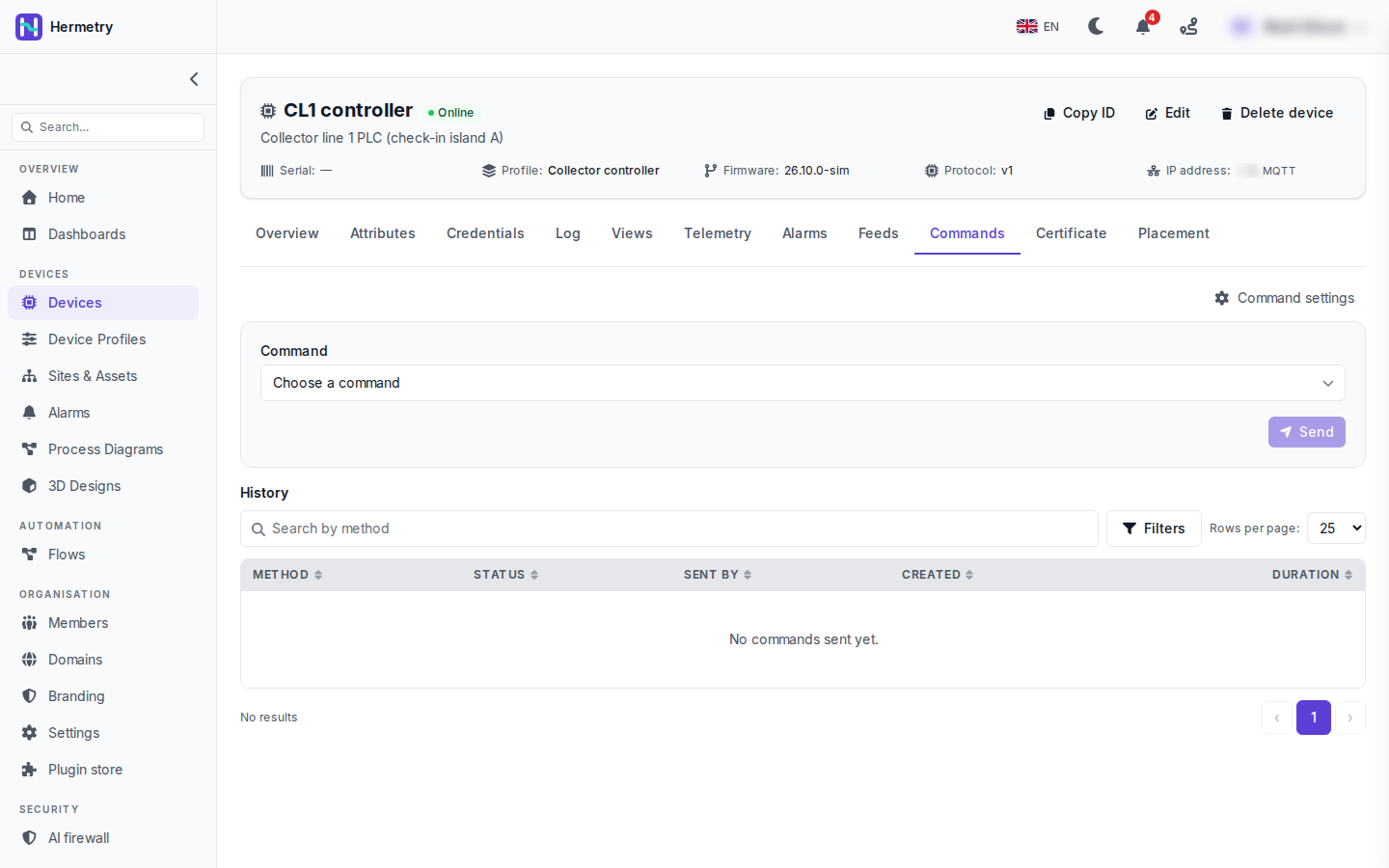 Üst yarıda Choose a command ve Send var. Ekran görüntüsünde henüz komut seçilmediği için Send gri görünüyor. Liste, cihazın profilindeki komut kataloğundan gelir (profile, Commands sekmesi, Add command).Bir komut seçtiğinizde parametreleri görünür ve birkaç seçenek vardır: one-way, yanıt zaman aşımı, cihaz geri geldiğinde iletilme (persistent) ve kuyruğa alınmış bir komutun vazgeçilmeden önce ne kadar bekleyeceği. Yüksek etki olarak işaretlenmiş bir komut onay ister, bazen yazılması gereken bir ifadeyle birlikte.Alt yarı History bölümüdür: Method, Status, Sent by, Created ve Duration, yönteme göre arama ve filtrelerle. Burada “No commands sent yet.” yazıyor. Benim en faydalı bulduğum sütun Sent by. Komutun konsoldan, API’den, bir flow’dan, firmware güncellemesinden, bir alarm eyleminden ya da bir dashboard kontrolünden gelip gelmediğini gösteriyor. Bir satıra tıklandığında istek, yanıt ve ilerleme görünür.Sending commands to devices sayfasında tüm durumların tam listesi bulunuyor.
Since 2.2.0 the device page has a Commands tab. This is the tab on our test workspace before anyone has sent anything: CL1 controller, “Collector line 1 PLC (check-in island A)”, online, profile Collector controller, firmware 26.10.0-sim, MQTT.
Top half: Choose a command and Send. Send is greyed out in the shot, with no command picked yet. The list comes from the command catalog on the device’s profile (profile, Commands tab, Add command).
Once you pick one, its parameters appear, and there are a few options: one-way, the answer timeout, deliver when the device comes back (persistent) and how long a queued command waits before it’s given up. A command marked high impact asks you to confirm, sometimes with a phrase to type.
Bottom half is the History: Method, Status, Sent by, Created and Duration, with a search by method and filters. Here it says “No commands sent yet.” Sent by is the column I find most useful. It tells you whether the command came from the console, the API, a flow, a firmware update, an alarm action or a dashboard control. Opening a row shows the request, the response and the progress.
Sending commands to devices has the full list of states.
Yapay zekâ tarafından English dilinden çevrildi ·
Burada kim neyi gönderebilir? Operatörlerimizin hepsi User rolünde.
Who can send what here? Our operators are all Users.
Yapay zekâ tarafından English dilinden çevrildi ·
Kataloğdaki her komutun bir seviyesi vardır. Varsayılan olarak Basic seviyesi Users, Privileged ve Critical seviyesi yöneticiler içindir; kataloğda bulunmayan ham bir method ise yalnızca owner’lar içindir. Bir operatörün privileged komutlara ihtiyacı varsa, onu Admin yapmadan iot_rpc.send.privileged yetkisine sahip özel bir grup bunu sağlar.
Each command in the catalog has a tier. By default Basic is for Users, Privileged and Critical for administrators, and a raw method that isn’t in the catalog is owners only. If one operator needs privileged commands, a custom group with iot_rpc.send.privileged does it without making them Admin.
Yapay zekâ tarafından English dilinden çevrildi ·
Cihaz gerçekte ne alıyor? Gelecek hafta PLC tarafını yazmaya başlıyorum.
What does the device actually receive? Writing the PLC side next week.
Yapay zekâ tarafından English dilinden çevrildi ·
Cihaz v1/rpc/req/+ konusuna abone olur ve method ile params bilgisini alır; iki yönlü bir komut için aynı id ile yanıt verir:
PUBLISH v1/rpc/req/42
{"method": "sys.ping", "params": {"host": "8.8.8.8", "count": 3}}

PUBLISH v1/rpc/res/42
{"ok": true, "result": {"sent": 3, "received": 3, "avg_ms": 18.2}}
Komutlar, cihaz o bağlantıda abone olduktan sonra iletilir.
It subscribes to v1/rpc/req/+ and gets the method and params; for a two-way command it answers on the same id:
PUBLISH v1/rpc/req/42
{"method": "sys.ping", "params": {"host": "8.8.8.8", "count": 3}}

PUBLISH v1/rpc/res/42
{"ok": true, "result": {"sent": 3, "received": 3, "avg_ms": 18.2}}
Commands are only delivered after the device has subscribed on that connection.
Yapay zekâ tarafından English dilinden çevrildi ·
Firmware’i yazan kişi için: istek kimliğine göre tekrarları ayıklayın. Bir komut iki kez gelebilir. Son 32 kimliği on dakika boyunca tutun ve tekrarları atlayın. Bunu bir yeniden başlatma komutuyla öğrendim.
For whoever writes the firmware: dedupe on the request id. A command can arrive twice. Keep the last 32 ids for ten minutes and skip repeats. Learned that with a reboot command.
Yapay zekâ tarafından English dilinden çevrildi ·
Test PLC’miz sys.ping’e yanıt veriyor, geçmişte Successful ve süre görünüyor. Her yeniden bağlantıdan sonra tekrar abone olması gerektiğini anlamam bir saatimi aldı, ben bunu yalnızca açılışta yapıyordum.
Got our test PLC answering sys.ping, history shows Successful and the duration. Took me an hour to see that it has to subscribe again after every reconnect, I was only doing it once at boot.
- Bu konuyu yanıtlamak için giriş yapmış olmalısınız.
Sohbete katılın
Soru sormak ve yanıtlamak, yararlı gönderileri beğenmek ve sorununuzu çözen yanıtı işaretlemek için oturum açın. Her katkı puan ve seviye kazandırır.