


Der Commands-Tab auf einem neuen Controller, vor dem ersten Befehl
Von English mit KI übersetzt ·
Seit 2.2.0 gibt es auf der Geräteseite einen Commands-Tab. Das ist der Tab auf unserem Testarbeitsbereich, bevor jemand etwas gesendet hat: Controller CL1, „Collector line 1 PLC (check-in island A)“, online, Profil Collector controller, Firmware 26.10.0-sim, MQTT.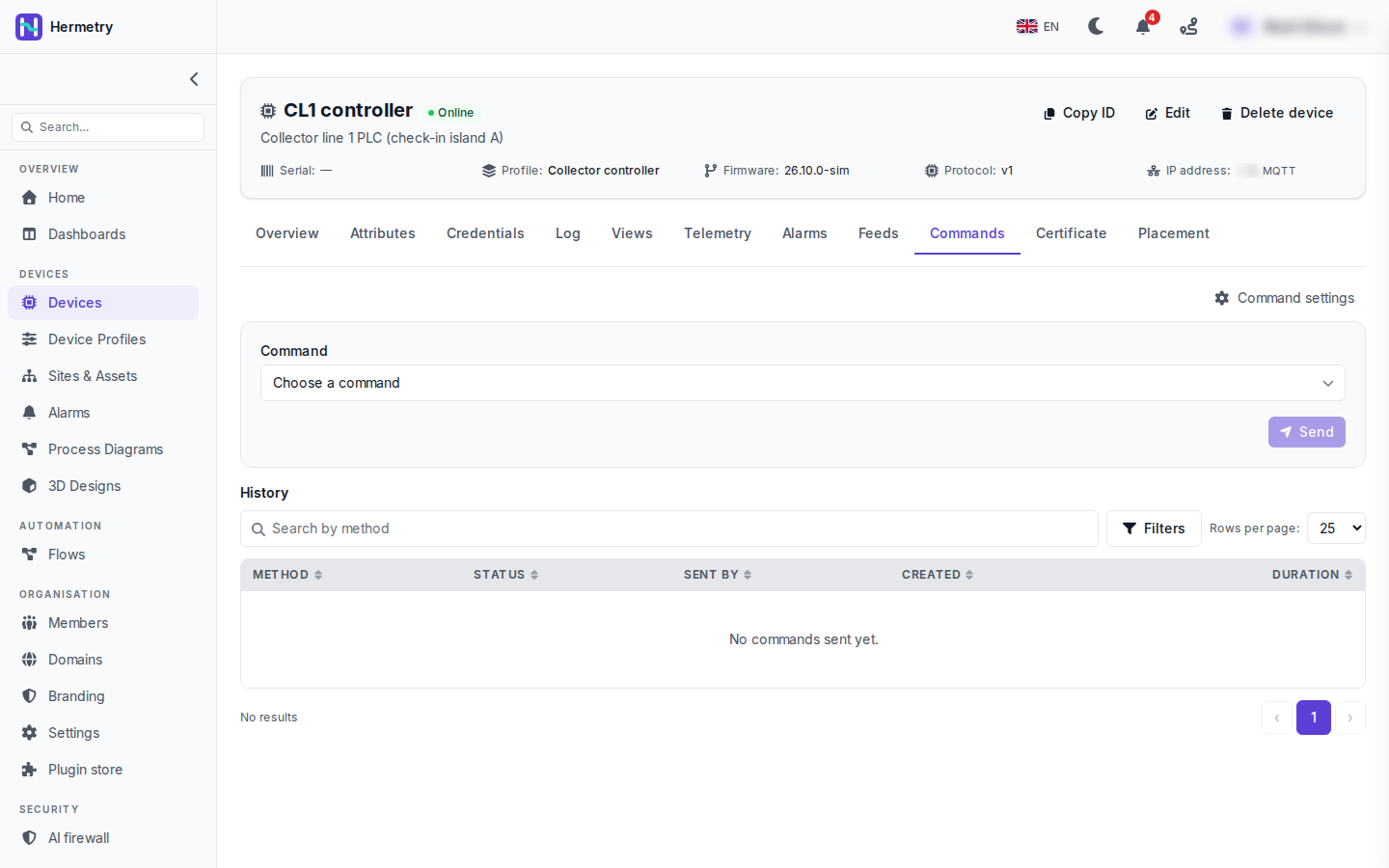 Obere Hälfte: Choose a command und Send. Send ist im Screenshot ausgegraut, da noch kein Befehl ausgewählt ist. Die Liste stammt aus dem Befehlskatalog im Profil des Geräts (Profil, Commands-Tab, Add command).Sobald Sie einen Befehl auswählen, erscheinen seine Parameter, und es gibt einige Optionen: one-way, das Antwort-Timeout, Zustellung bei Rückkehr des Geräts (persistent) und wie lange ein eingereihter Befehl wartet, bevor er aufgegeben wird. Ein Befehl mit als hoch markierter Auswirkung verlangt eine Bestätigung, manchmal mit einer einzugebenden Phrase.Die untere Hälfte ist die History: Method, Status, Sent by, Created und Duration, mit einer Suche nach Methode und Filtern. Hier steht „No commands sent yet.“ Sent by ist die Spalte, die ich am nützlichsten finde. Sie zeigt, ob der Befehl von der Konsole, der API, einem Flow, einem Firmware-Update, einer Alarmaktion oder einer Dashboard-Steuerung stammt. Ein Klick auf eine Zeile zeigt die Anfrage, die Antwort und den Fortschritt.Sending commands to devices enthält die vollständige Liste der Zustände.
Since 2.2.0 the device page has a Commands tab. This is the tab on our test workspace before anyone has sent anything: CL1 controller, „Collector line 1 PLC (check-in island A)“, online, profile Collector controller, firmware 26.10.0-sim, MQTT.
Top half: Choose a command and Send. Send is greyed out in the shot, with no command picked yet. The list comes from the command catalog on the device’s profile (profile, Commands tab, Add command).
Once you pick one, its parameters appear, and there are a few options: one-way, the answer timeout, deliver when the device comes back (persistent) and how long a queued command waits before it’s given up. A command marked high impact asks you to confirm, sometimes with a phrase to type.
Bottom half is the History: Method, Status, Sent by, Created and Duration, with a search by method and filters. Here it says „No commands sent yet.“ Sent by is the column I find most useful. It tells you whether the command came from the console, the API, a flow, a firmware update, an alarm action or a dashboard control. Opening a row shows the request, the response and the progress.
Sending commands to devices has the full list of states.
Von English mit KI übersetzt ·
Wer darf hier was senden? Unsere Bediener sind alle Users.
Who can send what here? Our operators are all Users.
Von English mit KI übersetzt ·
Jeder Befehl im Katalog hat eine Stufe. Standardmäßig ist Basic für Users, Privileged und Critical für Administratoren gedacht, und eine Raw-Methode, die nicht im Katalog steht, ist nur für Owner. Wenn ein Operator privilegierte Befehle benötigt, reicht eine benutzerdefinierte Gruppe mit iot_rpc.send.privileged, ohne dass er zum Admin werden muss.
Each command in the catalog has a tier. By default Basic is for Users, Privileged and Critical for administrators, and a raw method that isn’t in the catalog is owners only. If one operator needs privileged commands, a custom group with iot_rpc.send.privileged does it without making them Admin.
Von English mit KI übersetzt ·
Was empfängt das Gerät eigentlich? Ich schreibe nächste Woche die SPS-Seite.
What does the device actually receive? Writing the PLC side next week.
Von English mit KI übersetzt ·
Es abonniert v1/rpc/req/+ und erhält die method und params; bei einem zweiseitigen Befehl antwortet es mit derselben id:
PUBLISH v1/rpc/req/42
{"method": "sys.ping", "params": {"host": "8.8.8.8", "count": 3}}

PUBLISH v1/rpc/res/42
{"ok": true, "result": {"sent": 3, "received": 3, "avg_ms": 18.2}}
Befehle werden erst zugestellt, nachdem das Gerät auf dieser Verbindung abonniert hat.
It subscribes to v1/rpc/req/+ and gets the method and params; for a two-way command it answers on the same id:
PUBLISH v1/rpc/req/42
{"method": "sys.ping", "params": {"host": "8.8.8.8", "count": 3}}

PUBLISH v1/rpc/res/42
{"ok": true, "result": {"sent": 3, "received": 3, "avg_ms": 18.2}}
Commands are only delivered after the device has subscribed on that connection.
Von English mit KI übersetzt ·
Für alle, die die Firmware schreiben: Duplikate anhand der Request-ID aussortieren. Ein Befehl kann zweimal ankommen. Die letzten 32 IDs zehn Minuten lang speichern und Wiederholungen überspringen. Das habe ich bei einem Neustart-Befehl gelernt.
For whoever writes the firmware: dedupe on the request id. A command can arrive twice. Keep the last 32 ids for ten minutes and skip repeats. Learned that with a reboot command.
Von English mit KI übersetzt ·
Unsere Test-SPS antwortet auf sys.ping, im Verlauf steht Successful und die Dauer. Ich habe eine Stunde gebraucht, um zu erkennen, dass man nach jeder Wiederverbindung erneut subskribieren muss, ich hatte das nur einmal beim Start gemacht.
Got our test PLC answering sys.ping, history shows Successful and the duration. Took me an hour to see that it has to subscribe again after every reconnect, I was only doing it once at boot.
- Du musst angemeldet sein, um auf dieses Thema antworten zu können.
Mitdiskutieren
Melde dich an, um Fragen zu stellen und zu beantworten, hilfreiche Beiträge mit „Gefällt mir“ zu markieren und die Antwort zu kennzeichnen, die dein Problem gelöst hat. Jeder Beitrag bringt Punkte und Stufen.