


Yeni bir organizasyonda Sertifikalar sayfası ve burada görünecekler
Yapay zekâ tarafından English dilinden çevrildi ·
2.2.2 sürümü Sertifikalar sayfasını ekledi. Bu, yeni oluşturulmuş bir organizasyondaki görünümü; iki liste de boş. Cihaz CA’sından yalnızca lisanslı cihazlar, provisioning sırasında sertifika alır; bu yüzden lisanslı cihazı olmayan bir organizasyon da aynı görünümü görür. Kendi geliştirdiğiniz cihazlar erişim belirteçlerini veya MQTT basic yöntemini kullanmaya devam eder.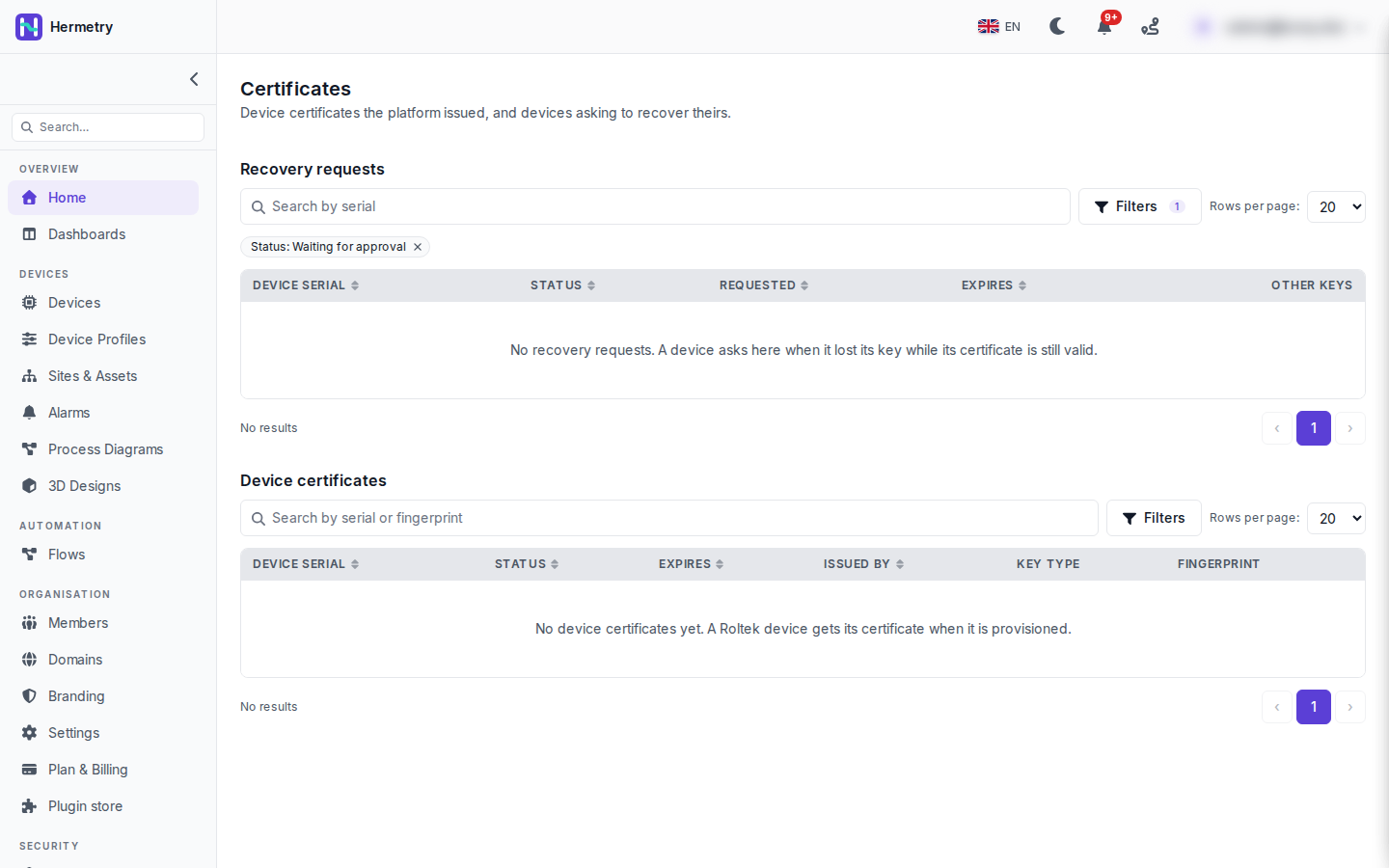 Sayfada iki liste bulunur.Kurtarma istekleri; burada Status: Waiting for approval olarak filtrelenmiş, cihaz seri numarası, durum, istek tarihi, son kullanma tarihi ve diğer anahtarlarla birlikte. Bir cihaz, mevcut sertifikası hâlâ geçerliyken yeni sertifika istediğinde buraya düşer. Bu, sıfırlanmış veya onarılmış bir cihaz ya da klon olabilir; bu yüzden Hermetry kendiliğinden sertifika vermez. “A device asks for a new certificate” bildirimini alırsınız ve kararı cihaz sayfasında verirsiniz. Onaylamak mevcut sertifikayı hemen iptal eder ve cihazın gösterilen anahtar için 7 gün içinde yeni sertifika almasına izin verir. Reddetmek mevcut sertifikayı korur ve hiçbir şey vermez. Yalnızca cihazın sıfırlandığını veya onarıldığını bildiğinizde onaylayın.Cihaz sertifikaları; seri numarasına veya parmak izine göre aranabilir, durum, son kullanma tarihi, veren, anahtar türü ve parmak izi ile birlikte. Durumlar Active, Superseded, Revoked ve Expired’dır. Güncel lisanslı cihazlar ECDSA P-256 kullanır ve ortak ad (common name) cihaz seri numarasıdır.Tek bir cihaz için, bir MQTT cihazının Certificate sekmesi sertifikasını, nasıl verildiğini (fabrikadan ilk sertifika, yenileme, kurtarma ve birkaç diğer durum) ve geçerlilik süresini gösterir. Sertifikayı bir neden belirterek iptal edin; onaylamak için seri numarasını yazarsınız ve cihazın bağlantısı hemen kesilir.Sertifikaları görüntülemek Admin düzeyinde bir yetkidir (
iot_pki.certificates.read). Son kullanma uyarıları Device Certificate Settings altında ayarlanır: varsayılan olarak 30 gün, 30 ile 180 arası.Belgeler: Device certificates, The device certificate authority.
2.2.2 added the Certificates page. This is it on a brand-new organisation, so both lists are empty. Only licensed devices get a certificate from the device CA, when they are provisioned, so an organisation without them sees the same. Devices you build yourselves keep using access tokens or MQTT basic.
The page has two lists.
Recovery requests, filtered here to Status: Waiting for approval, with device serial, status, requested, expires and other keys. A device appears here when it asks for a new certificate while its current one is still valid. That can be a device you reset or repaired, or a clone, so Hermetry doesn’t issue one on its own. You get the notice “A device asks for a new certificate” and decide on the device page. Approve revokes the current certificate at once and lets the device get a new one for the key shown, within 7 days. Reject keeps the current certificate and issues nothing. Approve only when you know the device was reset or repaired.
Device certificates, searchable by serial or fingerprint, with status, expiry, issuer, key type and fingerprint. Statuses are Active, Superseded, Revoked and Expired. Current licensed devices use ECDSA P-256, and the common name is the device serial.
For one device, an MQTT device’s Certificate tab shows its certificate, how it was issued (first certificate from the factory, renewal, recovery and a few more) and its validity. Revoke from the certificate with a reason; you type the serial to confirm, and the device is disconnected straight away.
Viewing certificates is an Admin-level permission (iot_pki.certificates.read). Expiry warnings are set under Device Certificate Settings: 30 days by default, 30 to 180.
Docs: Device certificates, The device certificate authority.
Yapay zekâ tarafından English dilinden çevrildi ·
Lisanslı ünitelerimiz için bunlar kendiliğinden mi yenilenir, yoksa 365 günün dolmasından önce bir işlem başlatmamız mı gerekir?
For our licensed units, do they renew by themselves or do we have to trigger something before the 365 days are up?
Yapay zekâ tarafından English dilinden çevrildi ·
Kendiliğinden, süresi dolmadan en geç 30 gün önce. Ayrıca “Sertifikayı yenile” (cert.renew komutu) ile bir sertifikanın erken yenilenmesini isteyebilirsiniz; yeni sertifika kullanıma girene kadar mevcut sertifika korunur. Yenilenmesi istenip de yenilenmeyen cihazlar, süresi dolmak üzere olanlarla birlikte yöneticilere bildirilir.
By themselves, at the latest 30 days before expiry. You can also ask one to renew early with Renew certificate (the cert.renew command); it keeps the current certificate until the new one is in use. Devices that were asked to renew and didn’t are reported to administrators along with the expiring ones.
Yapay zekâ tarafından English dilinden çevrildi ·
Uç durum: Bir gateway düğümü yeniden başlatıldıktan hemen sonra, iptal listesini (revocation set) yüklemeden önce, sertifikaları yalnızca zincir ve son geçerlilik tarihine bakarak kabul ediyor mu?
Edge case: right after a gateway node restarts, before it has loaded the revocation set, does it accept certificates on chain and expiry alone?
Yapay zekâ tarafından English dilinden çevrildi ·
Hayır, iptal listesi (revocation set) yüklenene kadar her sertifikayı reddeder. Ayrıca bir parola yedek yöntemi de yoktur: sunulan bir sertifika her zaman karar verir.
No, it refuses every certificate until its revocation set is loaded. There’s no password fallback either: a presented certificate always decides.
Yapay zekâ tarafından English dilinden çevrildi ·
Dün, lisanslı bir ünitede yapılan onarımdan sonra ilk kurtarma talebimiz geldi. Bildirim düştü, ünitenin teknisyenin onardığı ünite olduğunu onunla kontrol ettim, cihaz sayfasından onayladım ve birkaç dakika sonra ünite yeniden çevrimiçi oldu.
Had our first recovery request yesterday, after a repair on one licensed unit. The notice came in, I checked with the technician that it was the unit he’d repaired, approved it on the device page, and it was back online a few minutes later.
- Bu konuyu yanıtlamak için giriş yapmış olmalısınız.
Sohbete katılın
Soru sormak ve yanıtlamak, yararlı gönderileri beğenmek ve sorununuzu çözen yanıtı işaretlemek için oturum açın. Her katkı puan ve seviye kazandırır.