


Process diyagram düzenleyicisinde küçük bir su ağı, kuyulardan su deposuna
Yapay zekâ tarafından English dilinden çevrildi ·
Demo çalışma alanımız için 2.0 sürümünden beri örnek ekranlar çiziyorum. İnsanların en çok sorduğu su ağı, bu yüzden işte düzenleyicide.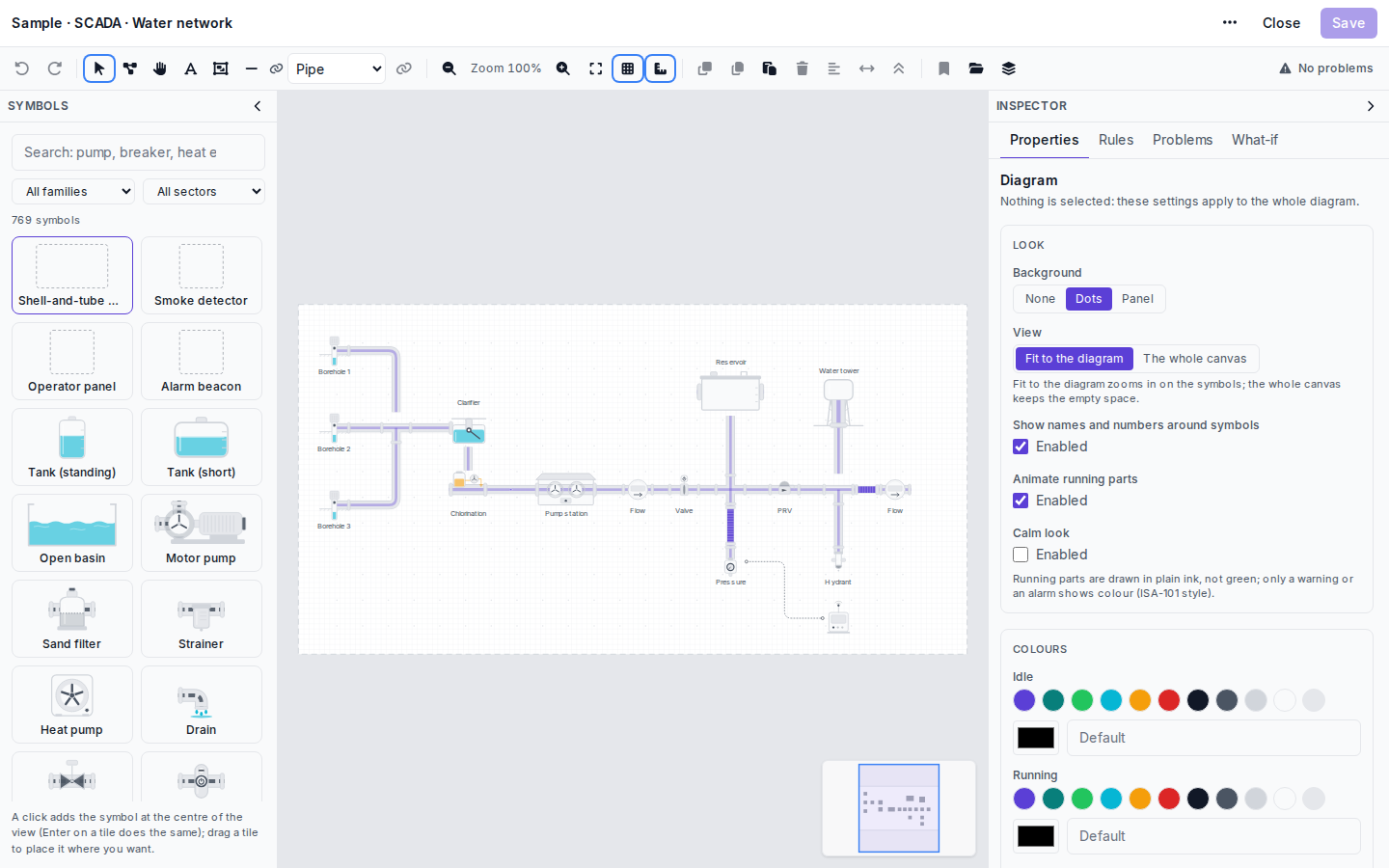 Soldan sağa: üç kuyu bir çökeltme havuzunu besliyor, ardından klorlama ve pompa istasyonu geliyor. İstasyondan sonra bir debimetre, bir vana, rezervuara çıkan kol, bir basınç düşürücü vana, su deposuna giden kol ve en sonda ikinci bir debimetre var. Basınç noktası ve yangın hidrantı ana hattın altında asılı duruyor, kesikli çizgi basınç noktasından küçük bir dolaba uzanıyor.Buradaki her şey çekirdek setten (kuyu, çökeltme havuzu, klorlayıcı, pompa istasyonu, PRV, hidrant ve su deposu hepsi Water network ailesinde) geldiği için çizim SCADA modülü olan her çalışma alanında açılır.Hiçbir şey seçili değilken sağdaki denetleyici tüm çizimin ayarlarını gösterir. Noktalı arka planı ve Fit to the diagram seçeneğini kullanıyorum, böylece bir kart boş tuval yerine sembollere yakınlaşır. Bu bir demo olduğu ve insanlar renkleri sevdiği için Calm look kapalı. Gerçek bir kontrol odası ekranında bunu açardım. Araç çubuğu No problems yazıyorsa sorun yoktur; yazmıyorsa Problems sekmesi neyin yanlış olduğunu söyler, örneğin tuvalde artık olmayan bir sembolde biten bir bağlantı gibi.Çizimin kendisi cihaz verisi tutmaz. Semboller değerlerini, kaydettikten sonra cihazın ya da tesisin Views ekranlarında alır: Binding symbols to live data.
I have been drawing sample screens for our demo workspace since 2.0. The water network is the one people ask about most, so here it is in the editor.
Left to right: three boreholes feed a clarifier, then chlorination and the pump station. After the station come a flow meter, a valve, the branch up to the reservoir, a pressure-reducing valve, the branch to the water tower and a second flow meter at the end. The pressure point and the hydrant hang below the main line, and the dotted line runs from the pressure point to a small cabinet.
Everything here is from the core set (borehole, clarifier, chlorinator, pump station, PRV, hydrant and water tower are all in the Water network family), so the drawing opens in any workspace that has the SCADA module.
With nothing selected, the inspector on the right shows the settings for the whole drawing. I keep the dots background and Fit to the diagram, so a card zooms in on the symbols and not on empty canvas. Calm look is off because this is a demo and people like colour. On a real control room screen I would turn it on. The toolbar says No problems; when it does not, the Problems tab tells you what is wrong, for example a connection that ends on a symbol that is no longer on the canvas.
The drawing itself holds no device data. The symbols get their values on the device’s or site’s Views after saving: Binding symbols to live data.
Yapay zekâ tarafından English dilinden çevrildi ·
Bu, sahip olduğumuz duruma oldukça yakın: hepsi aynı görünen iki sondaj kuyusu ve altı pompa istasyonu. Altı çizime ihtiyacım var mı?
This is close to what we have, two boreholes and six pump stations that all look the same. Do I need six drawings?
Yapay zekâ tarafından English dilinden çevrildi ·
Bir tane yeterli. Her cihaz kendi bağlantılarını korur. Altı istasyon aynı cihaz profilini paylaşıyorsa profili açın, başlığındaki Görünümler seçeneğini seçin ve çizimi tüm cihazlara tek seferde bağlayın. Bir tuzak var: profilin kendisinde hiçbir şey saklanmaz, bu yüzden daha sonra eklenen yedinci bir istasyon için işlemin yeniden çalıştırılması ya da görünümün elle eklenmesi gerekir. Birçok yer için tek çizim
One is enough. Each device keeps its own connections. If the six stations share a device profile, open the profile, choose Views in its header and bind the drawing to all of its devices in one go. One catch: nothing is stored on the profile itself, so a seventh station added later needs the run again or a view attached by hand. One drawing for many places
Yapay zekâ tarafından English dilinden çevrildi ·
Öğrenci sorusu: PRV neden pompa istasyonunun hemen ardından değil de rezervuar kolunun sonrasında yer alıyor?
Student question: why is the PRV after the reservoir branch and not right after the pump station?
Yapay zekâ tarafından English dilinden çevrildi ·
Bu örnekte rezervuar kolu, PRV’den önce ayrılıyor; bu nedenle rezervuar pompaların basıncını alıyor. PRV, kendisinden sonra gelen her şeyin basıncını düşürür; çizimde bu, kule kolunu ve yangın hidrantını da kapsar. Ancak bu, sembolleri göstermek için çizdiğim bir demo düzeni; bir hidrolik tasarım değil, bu yüzden bir ağın nasıl kurulması gerektiğine dair örnek olarak alma.
In this sample the reservoir branch takes off before the PRV, so the reservoir gets the pumps’ pressure. The PRV lowers the pressure for everything after it, which in the drawing includes the tower branch and the hydrant. But it is a demo layout I drew to show the symbols, not a hydraulic design, so please do not take it as how a network should be built.
Yapay zekâ tarafından English dilinden çevrildi ·
Haklısın, cevap verdiğin için teşekkürler!
Fair enough, thanks for answering!
Yapay zekâ tarafından English dilinden çevrildi ·
Borulardaki akış oku her boru için ayrı mı ayarlanıyor yoksa tüm çizim için mi?
Is the flow arrow on the pipes set per pipe or for the whole drawing?
Yapay zekâ tarafından English dilinden çevrildi ·
Her bağlantı için. Boruyu seçin ve denetçideki Akış oku kutucuğunu işaretleyin. Varsayılan olarak kapalıdır.
Per connection. Select the pipe and tick Flow arrow in the inspector. It is off by default.
Yapay zekâ tarafından English dilinden çevrildi ·
Ağ ekranımız için ilk etkinleştirdiğim şey sakin bir görünümdü. Nöbetteki operatörler eski genel görünümün bir Noel ağacına benzediğini söyledi.
Calm look was the first thing I switched on for our network screen. The duty operators said the old overview looked like a Christmas tree.
- Bu konuyu yanıtlamak için giriş yapmış olmalısınız.
Sohbete katılın
Soru sormak ve yanıtlamak, yararlı gönderileri beğenmek ve sorununuzu çözen yanıtı işaretlemek için oturum açın. Her katkı puan ve seviye kazandırır.