


SNMP UPS'ler, bir kamera ve MQTT batarya depolama istasyonları için tek bir cihaz listesi
Yapay zekâ tarafından English dilinden çevrildi ·
Buraya paylaştığım SCADA ekranlarının arkasında cihazlar olması gerekiyor ve demo çalışma alanımızda bunlar üç çok farklı yolla geliyor. Hepsi aynı Devices listesinde toplanıyor.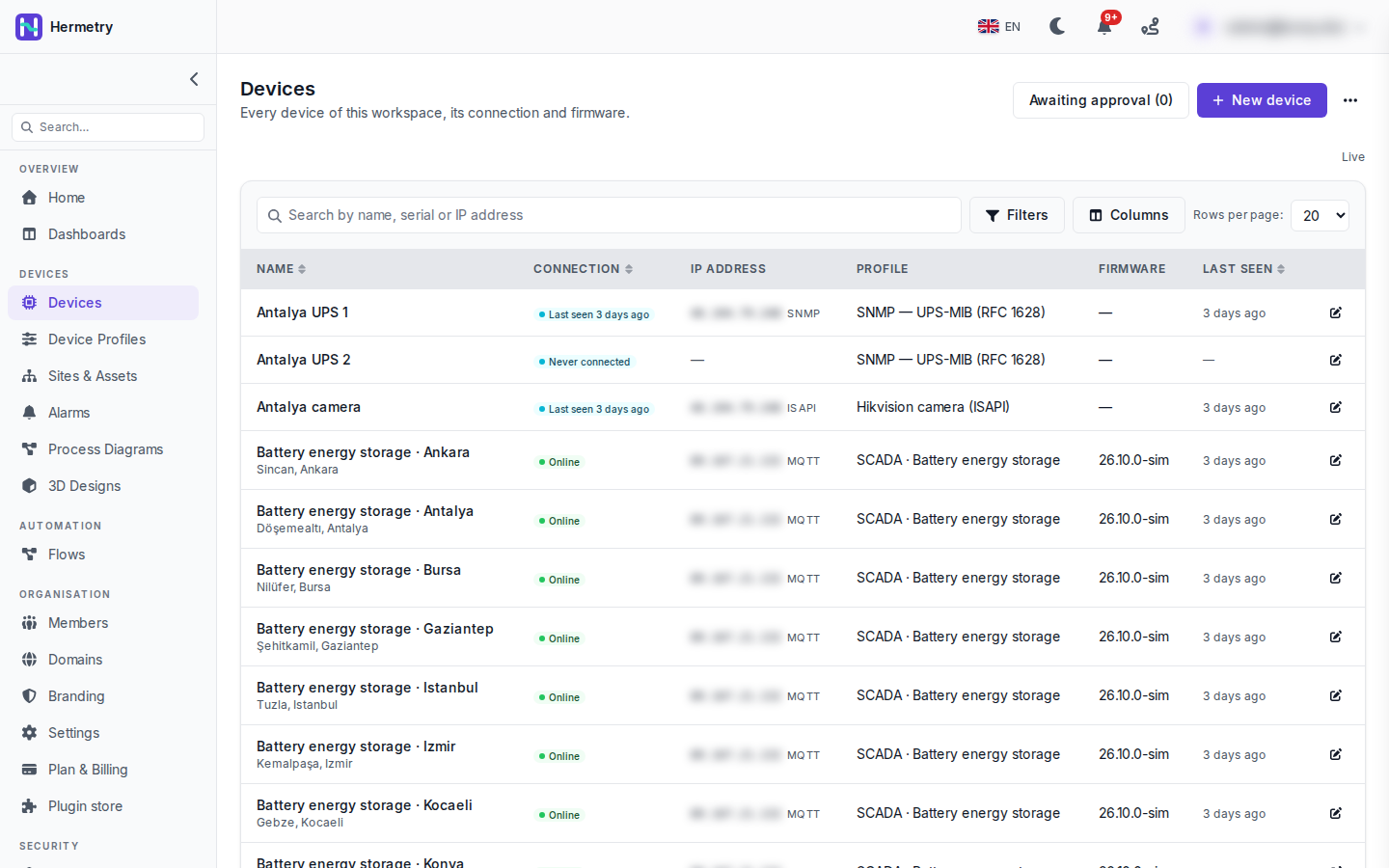 En üstte, Hermetry’nin UPS-MIB (RFC 1628) profiliyle SNMP üzerinden sorguladığı iki UPS ve HTTP API’si (ISAPI) üzerinden bağlanan bir kamera var. Platform bunlara bir uç nokta üzerinden ulaşıyor; bunlar kendi kendilerine oturum açmıyor. Bunların altında, MQTT üzerinden kendi başlarına bağlanan ve SCADA · Battery energy storage profilini kullanan batarya enerji depolama istasyonları yer alıyor. Firmware sütunu, bildirdikleri sürümü, 26.10.0-sim’i gösteriyor.Listede beğendiğim şeyler:
- IP adresi sütunu, adresin yanında protokolün adını gösteriyor: SNMP, ISAPI veya MQTT. Adresler ekran görüntüsünde bulanıklaştırılmış.
- Sorgulanan cihazlar yalnızca Last seen kuralını kullanıyor; bu yüzden MQTT cihazları Online gösterirken bunlar “Last seen 3 days ago” gösteriyor. UPS 2 hiç yanıt vermediği için Never connected görünüyor ve adresi yok.
- Arama ad, seri numarası ve IP adresini kapsıyor; yanında Filters ve Columns bulunuyor.
Dokümanlar: The Devices list and the device page, Polling devices over SNMP.
The SCADA screens I post here need devices behind them, and in our demo workspace they come in three very different ways. They all end up in the same Devices list.
At the top are two UPSs that Hermetry polls over SNMP with the UPS-MIB (RFC 1628) profile, and a camera on its HTTP API (ISAPI). The platform reaches these through an endpoint; they never log in themselves. Below them are the battery energy storage stations, which connect on their own over MQTT and use the SCADA · Battery energy storage profile. Their firmware column shows the version they report, 26.10.0-sim.
What I like about the list:
- The IP address column names the protocol next to the address: SNMP, ISAPI or MQTT. The addresses are blurred in the screenshot.
- Polled devices use the Last seen only rule, so they show “Last seen 3 days ago” where the MQTT ones show Online. UPS 2 has never answered, so it reads Never connected and has no address.
- Search covers name, serial and IP address, with Filters and Columns beside it.
Docs: The Devices list and the device page, Polling devices over SNMP.
Yapay zekâ tarafından English dilinden çevrildi ·
SNMP sorgulaması nereden çalışıyor? UPS ağ kartlarımız genel adresi olmayan özel bir LAN üzerinde bulunuyor.
Where does the SNMP polling run from? Our UPS network cards sit on a private LAN with no public address.
Yapay zekâ tarafından English dilinden çevrildi ·
Poller bulutta çalışır ve özel adresler reddedilir. Ya agent’a VPN veya tünel üzerinden genel bir adresle ulaşırsınız ya da saha ağına bir Hermetry Edge yerleştirirsiniz; bu durumda platform, port yönlendirmeye gerek kalmadan UPS’e Edge’in şifreli bağlantısı üzerinden ulaşır. Trap’ler yalnızca sahada, lisanslı bir gateway tarafından alınır, bulutta trap dinleyicisi yoktur.
The poller runs in the cloud, and private addresses are refused. You either reach the agent at a public address through a VPN or tunnel, or put a Hermetry Edge on the site network; the platform then reaches the UPS over Edge’s encrypted connection without port forwarding. Traps are only received on site by a licensed gateway, the cloud has no trap listener.
Yapay zekâ tarafından English dilinden çevrildi ·
Edge olduğu kesin. v3 ile authPriv kullanıyorsun sanırım?
Edge it is. v3 with authPriv I assume?
Yapay zekâ tarafından English dilinden çevrildi ·
Evet, authPriv ile SNMPv3 varsayılandır. Bir yönetici açana kadar v2c her çalışma alanında kapalıdır, çünkü community string düz metin olarak iletilir.
Yes, SNMPv3 with authPriv is the default. v2c is switched off for every workspace until an admin turns it on, because the community string travels in plaintext.
Yapay zekâ tarafından English dilinden çevrildi ·
Kameraya hangi hesabı verdiniz?
Which account did you give the camera?
Yapay zekâ tarafından English dilinden çevrildi ·
Kamerada yalnızca görüntüleme yetkisine sahip bir kullanıcı kullanın, asla yönetici hesabını değil. Canlı görüntü ve sağlık okumaları için platformun başka bir şeye ihtiyacı yok; yalnızca kamera olayları alarm almak için de ayrıca yetkiye ihtiyaç duyar. Kamera veya kayıt cihazı ekleme
A view-only user on the camera, never the admin account. For live view and the health readings the platform needs nothing more; only camera events need the right to receive alarms as well. Add a camera or recorder
Yapay zekâ tarafından English dilinden çevrildi ·
Bunu okuduktan sonra fark ettiğim küçük bir şey: arama ve filtreler sayfa adresinde kalıyor. Bir meslektaşıma Connection değeri Offline olarak ayarlanmış bir bağlantı gönderdim ve onun ekranında da aynı filtrelenmiş liste açıldı.
Small thing I found after reading this: the search and filters stay in the page address. I sent a colleague a link with Connection set to Offline and it opened the same filtered list for him.
- Bu konuyu yanıtlamak için giriş yapmış olmalısınız.
Sohbete katılın
Soru sormak ve yanıtlamak, yararlı gönderileri beğenmek ve sorununuzu çözen yanıtı işaretlemek için oturum açın. Her katkı puan ve seviye kazandırır.