


El nuevo diálogo de dashboard en 2.3.0 y lo que muestra cuando se agotan los tableros compartidos
Traducido del English por IA ·
El diálogo New dashboard cambió un poco en la 2.3.0. Start from es ahora una lista con búsqueda y una breve descripción de cada plantilla. En la captura está cerrado en An empty dashboard, descrito como «Add the cards yourself.»
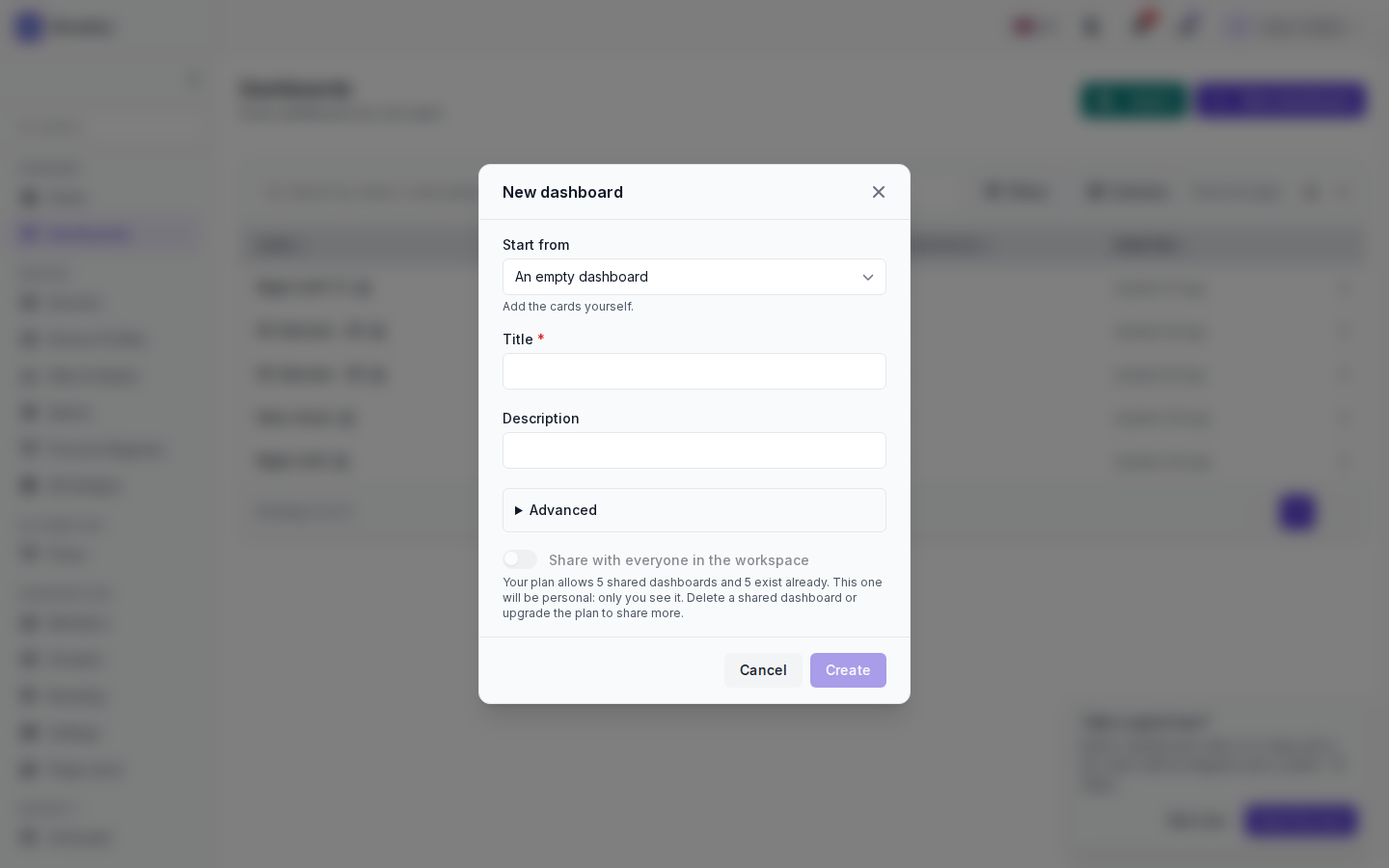
Debajo están Title (required), Description, Advanced y el interruptor Share with everyone in the workspace. El espacio de trabajo en el que me encargué de esto está en su límite, así que el interruptor está desactivado y en gris, y el diálogo explica por qué: el plan permite 5 dashboards compartidos, ya existen 5, por lo que este será personal. Para compartir más, elimina un dashboard compartido o mejora el plan. En la captura el título sigue vacío y Create aparece en gris.
En Advanced puedes mostrar el tablero en el menú de un espacio de trabajo, o dejarlo independiente en la lista de dashboards. El resto está en Create and organise boards.
The New dashboard dialog changed a little in 2.3.0. Start from is now a searchable list with a short description of each starter. In the screenshot it is closed on An empty dashboard, described as «Add the cards yourself.»
Below it are Title (required), Description, Advanced and the Share with everyone in the workspace switch. The workspace I took this on is at its limit, so the switch is off and greyed out, and the dialog says why: the plan allows 5 shared dashboards, 5 exist already, so this one will be personal. To share more, delete a shared dashboard or upgrade the plan. In the shot the title is still empty and Create is greyed out.
Under Advanced you can show the board in the menu of a workspace, or leave it standalone in the dashboards list. The rest is on Create and organise boards.
Traducido del English por IA ·
Si más adelante se libera una ranura compartida, ¿puedo compartir un tablero que se creó como personal debido al límite?
If a shared slot frees up later, can I share a board that came out personal because of the limit?
Traducido del English por IA ·
Sí. Abra el panel, Settings y, en Who sees it, elija Share with the workspace. No funciona al revés: un panel compartido no vuelve a ser personal, en su lugar debe duplicarlo.
Yes. Open the board, Settings, and under Who sees it choose Share with the workspace. It doesn’t go the other way: a shared board is not made personal again, you duplicate it instead.
Traducido del English por IA ·
¿Entonces mis 30 y pico boards personales no descuentan de los 5?
So my 30-odd personal boards don’t eat into the 5?
Traducido del English por IA ·
Correcto, los tableros personales no cuentan. Solo cuentan los compartidos.
Right, personal boards don’t count. Only shared ones do.
Traducido del English por IA ·
La búsqueda en Start from es útil. Escribí «alarm» y apareció Devices and alarms.
The search in Start from is nice. Typed «alarm» and Devices and alarms came up.
- Debes estar registrado para responder a este debate.
Únete a la conversación
Inicia sesión para preguntar y responder, dar me gusta a las publicaciones útiles y marcar la respuesta que resolvió tu problema. Cada aportación suma puntos y niveles.