


Der neue Dashboard-Dialog in 2.3.0 und was er anzeigt, wenn geteilte Boards aufgebraucht sind
Von English mit KI übersetzt ·
Der Dialog „New dashboard“ hat sich in 2.3.0 etwas verändert. Start from ist jetzt eine durchsuchbare Liste mit einer kurzen Beschreibung jeder Vorlage. Im Screenshot ist er auf An empty dashboard geschlossen, beschrieben als „Add the cards yourself.“
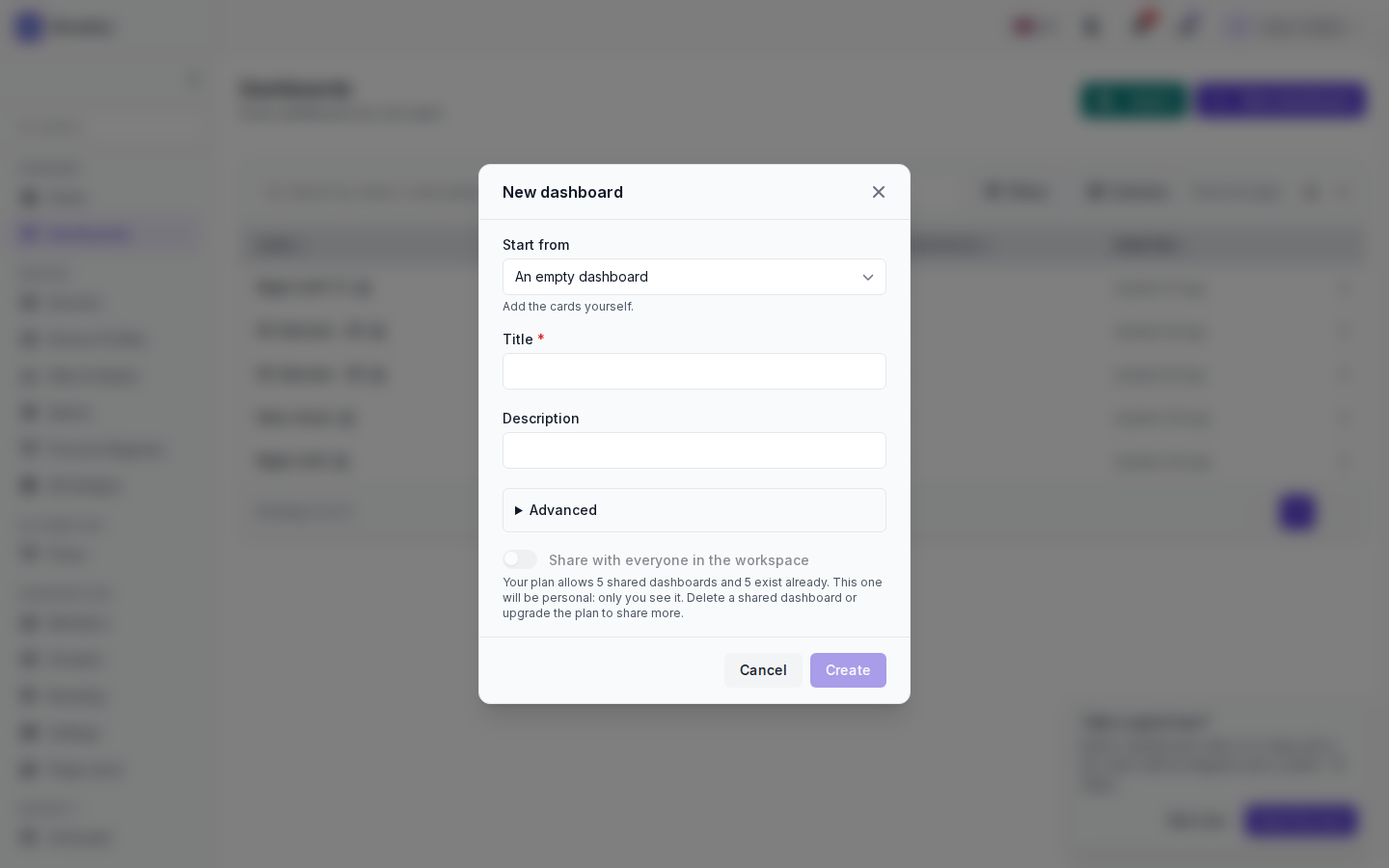
Darunter stehen Title (required), Description, Advanced und der Schalter Share with everyone in the workspace. Der Arbeitsbereich, in dem ich das übernommen habe, ist am Limit, daher ist der Schalter aus und ausgegraut, und der Dialog nennt den Grund: Der Tarif erlaubt 5 geteilte Dashboards, es gibt bereits 5, daher wird dieses persönlich sein. Um mehr zu teilen, löschen Sie ein geteiltes Dashboard oder upgraden Sie den Tarif. Im Screenshot ist der Titel noch leer und Create ausgegraut.
Unter Advanced können Sie das Board im Menü eines Arbeitsbereichs anzeigen lassen oder es eigenständig in der Dashboard-Liste belassen. Der Rest steht unter Create and organise boards.
The New dashboard dialog changed a little in 2.3.0. Start from is now a searchable list with a short description of each starter. In the screenshot it is closed on An empty dashboard, described as „Add the cards yourself.“
Below it are Title (required), Description, Advanced and the Share with everyone in the workspace switch. The workspace I took this on is at its limit, so the switch is off and greyed out, and the dialog says why: the plan allows 5 shared dashboards, 5 exist already, so this one will be personal. To share more, delete a shared dashboard or upgrade the plan. In the shot the title is still empty and Create is greyed out.
Under Advanced you can show the board in the menu of a workspace, or leave it standalone in the dashboards list. The rest is on Create and organise boards.
Von English mit KI übersetzt ·
Wenn später ein geteilter Platz frei wird, kann ich dann ein Board teilen, das wegen des Limits als persönliches angelegt wurde?
If a shared slot frees up later, can I share a board that came out personal because of the limit?
Von English mit KI übersetzt ·
Ja. Öffnen Sie das Board, dann Settings, und wählen Sie unter Who sees it die Option Share with the workspace. Der umgekehrte Weg ist nicht möglich: Ein geteiltes Board lässt sich nicht wieder privat machen, Sie müssen stattdessen eine Kopie erstellen.
Yes. Open the board, Settings, and under Who sees it choose Share with the workspace. It doesn’t go the other way: a shared board is not made personal again, you duplicate it instead.
Von English mit KI übersetzt ·
Meine gut 30 persönlichen Boards zählen also nicht auf die 5?
So my 30-odd personal boards don’t eat into the 5?
Von English mit KI übersetzt ·
Richtig, persönliche Boards zählen nicht. Nur geteilte zählen.
Right, personal boards don’t count. Only shared ones do.
Von English mit KI übersetzt ·
Die Suche in Start from ist gut. Ich habe „alarm“ eingegeben, und Devices and alarms wurde angezeigt.
The search in Start from is nice. Typed „alarm“ and Devices and alarms came up.
- Du musst angemeldet sein, um auf dieses Thema antworten zu können.
Mitdiskutieren
Melde dich an, um Fragen zu stellen und zu beantworten, hilfreiche Beiträge mit „Gefällt mir“ zu markieren und die Antwort zu kennzeichnen, die dein Problem gelöst hat. Jeder Beitrag bringt Punkte und Stufen.