


Automation'daki kullanım kartının size anlattıkları, koruma satırı dahil
Yapay zekâ tarafından English dilinden çevrildi ·
Bu, test çalışma alanlarımızdan birinde bu sabah alınmış Automation ekranının üst kısmıdır. Çoğu kişi akışlarına ulaşmak için kartı geçip gider, o yüzden üzerinde neler olduğunu anlatayım.
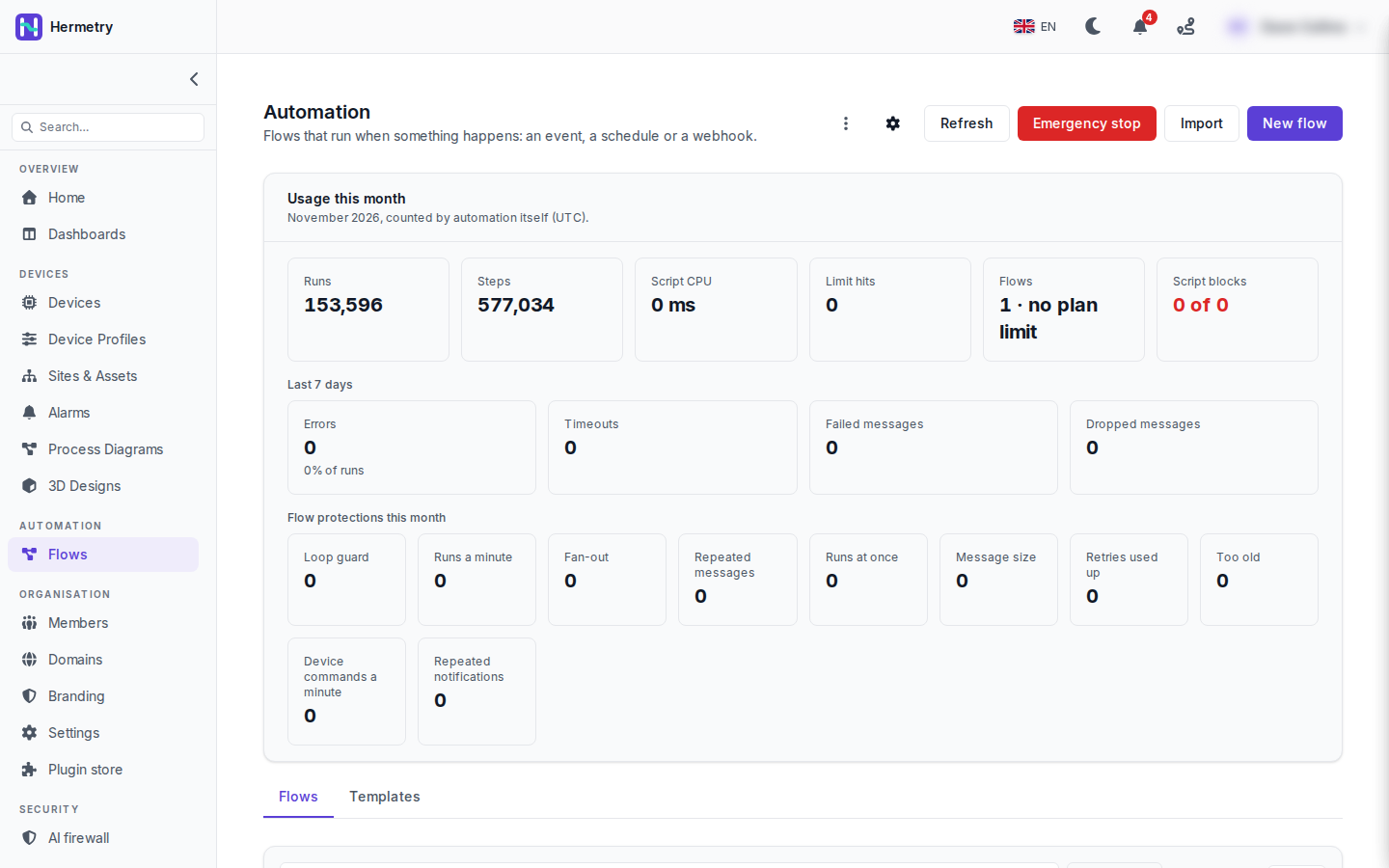
Bu ayın kullanımı, şimdiye kadar Kasım, UTC’ye göre sayılıyor: 153.596 çalıştırma ve 577.034 adım, yani çalıştırma başına yaklaşık 3,8 adım. Script CPU 0 ms ve Limit hits 0. Flows “1 · plan limiti yok” diyor. Script blocks kırmızı renkte “0 of 0” gösteriyor. Flows ve Script blocks, plana karşı sayılan iki kutu; script blocks yalnızca yayınlanmış akışlarda sayılır.
Son 7 gün satırında Errors (çalıştırmalara oranıyla, burada %0), Timeouts, Failed messages ve Dropped messages var.
Bir akış garip davrandığında ilk bakacağım satır, bu ayki Flow protections satırıdır. Her kutu o korumanın kaç kez devreye girdiğini sayar: Loop guard, Runs a minute, Fan-out, Repeated messages, Runs at once, Message size, Retries used up, Too old, Device commands a minute ve Repeated notifications. Burada hepsi sıfır. Bunların arkasındaki varsayılanlar Protections and failed messages sayfasında; en çok sorulanlar: bir akış bir dakikada 6.000 çalıştırmadan sonra kendini duraklatır, bir akışın en fazla 16 çalıştırması aynı anda çalışır ve gerisi bekler, akışlar bir cihaza bir dakikada 30 komuta kadar gönderebilir ve bir mesaj 256 KiB olabilir.
Üst başlıkta Refresh, kırmızı Emergency stop, Import ve New flow düğmeleri ile kartın altındaki Flows ve Templates sekmeleri var.
This is the top of Automation on one of our test workspaces, taken this morning. Most people scroll past the card to get to their flows, so here is what’s on it.
Usage this month is November so far, counted in UTC: 153,596 runs and 577,034 steps, so about 3.8 steps per run. Script CPU is 0 ms and Limit hits 0. Flows says “1 · no plan limit”. Script blocks reads “0 of 0” in red. Flows and Script blocks are the two boxes counted against the plan; script blocks count only in deployed flows.
The Last 7 days row has Errors (with the share of runs, 0 % here), Timeouts, Failed messages and Dropped messages.
The row I’d look at first when a flow behaves oddly is Flow protections this month. Each box counts how often that protection acted: Loop guard, Runs a minute, Fan-out, Repeated messages, Runs at once, Message size, Retries used up, Too old, Device commands a minute and Repeated notifications. All zero here. The defaults behind them are on Protections and failed messages; the ones I get asked about most: a flow pauses itself after 6,000 runs in a minute, at most 16 runs of one flow go at once and the rest wait, flows may send one device 30 commands a minute, and a message may be 256 KiB.
Up in the header there’s Refresh, the red Emergency stop, Import and New flow, and the Flows and Templates tabs under the card.
Yapay zekâ tarafından English dilinden çevrildi ·
Ne yaptığını görmek için Acil durdurma düğmesine bir kez basmak güvenli mi? Cihaz verilerimizin depolanmasının durmasını istemiyorum.
Is it safe to press Emergency stop once to see what it does? I don’t want our device data to stop being stored.
Yapay zekâ tarafından English dilinden çevrildi ·
Canlı cihazların bağlı olduğu bir çalışma alanında bunu denemeyin. Her host üzerindeki çalışan tüm akışları duraklatır; kök akışlar da dahildir ve cihaz verilerinizi saklayan kök akıştır. Cihaz mesajları, zamanlamalar ve webhook’lar, akışlar devam ettirilene kadar hiçbir çalışma başlatmaz.Önce onay ister: “Akışlar devam ettirilene kadar hiçbir şeyin çalışmayacağını anlıyorum.” kutusunu işaretlersiniz ve STOP yazarsınız. Akışları devam ettirmek, durdurma işleminin duraklattığı her akışı geri getirir. Daha önce kendi kendine duraklamış bir akış duraklatılmış kalır. Her ikisi de denetim günlüğündedir.
Don’t try it on a workspace with live devices. It pauses every running flow on every host, root flows included, and the root flow is the one storing your device data. Device messages, schedules and webhooks start no run until you resume.
It does ask first: you tick “I understand that nothing runs until the flows are resumed.” and type STOP. Resume the flows brings back every flow the stop paused. A flow that had paused itself before stays paused. Both are in the audit log.
Yapay zekâ tarafından English dilinden çevrildi ·
Neden 150 bin çalıştırmaya rağmen Script CPU 0 ms? Her çalıştırmanın CPU kullandığını düşünmüştüm.
Why is Script CPU 0 ms with 150k runs? I thought every run used CPU.
Yapay zekâ tarafından English dilinden çevrildi ·
Script CPU yalnızca Script bloklarının CPU süresini sayar, çalışmanın geri kalanını değil. 0 ms, bu ayki çalışmaların hiçbirinin bir Script bloğunda zaman harcamadığı anlamına gelir.
Script CPU only counts the CPU time of Script blocks, not the rest of the run. 0 ms means none of this month’s runs spent time in one.
Yapay zekâ tarafından English dilinden çevrildi ·
Geçen ay “Runs a minute” kesintisi yaşadık. Mesaj geldikçe durumunu değiştiren bir bloğu bir Status tetikleyicisi izliyordu, bu yüzden akış kendi kendini sürekli yeniden başlatıyordu. Akış durdu, “Flow paused itself” uyarısı geldi ve Activity > Errors sorunu açıkça gösterdi.
We had Runs a minute trip last month. A Status trigger was watching a block that changed its status on every message, so the flow kept starting itself. It paused, the “Flow paused itself” alert came in, and Activity > Errors made it obvious.
Yapay zekâ tarafından English dilinden çevrildi ·
Yine o konu. Düzeltmeden sonra: Deploy, ardından akışın satır menüsünden Resume. Duraklatma, akışın belleğini ve bekleyen mesajları korur.
That one again. After the fix: Deploy, then Resume from the flow’s row menu. The pause keeps the flow’s memory and the messages that were waiting.
Yapay zekâ tarafından English dilinden çevrildi ·
Akışlardan cihaz başına dakikada 30 komut: iki dakika boyunca her saniye bir vanayı açıp kapatan bir temizleme dizimimiz var. Bu limite takılır mı?
30 commands a minute per device from flows: we have a flush sequence that toggles a valve every second for two minutes. That would hit it?
Yapay zekâ tarafından English dilinden çevrildi ·
Evet. Her saniye bir anahtarlama dakikada 60 eder; bu, tek bir cihaza dakikada 30 komut ve ayar olan akış limitinin üzerindedir (1 ile 600 arasında herhangi bir değere ayarlanabilir) ve genel komut limiti cihaz başına dakikada 10’dur. Limitin üzerindeki komutlar reddedilir. Zaten bir saniyelik bir diziyi buluttan yönetmezdim. Diziyi cihaz yazılımına koyun ve onu başlatan tek bir komut gönderin; süre de bir parametre olarak verilsin.
Yes. A toggle every second is 60 a minute, over the flows limit of 30 commands and settings a minute to one device (it can be set anywhere from 1 to 600), and the general command limit is 10 per device per minute. Commands over the limit are refused. I wouldn’t drive a one-second sequence from the cloud anyway. Put the sequence in the device firmware and send one command that starts it, with the duration as a parameter.
- Bu konuyu yanıtlamak için giriş yapmış olmalısınız.
Sohbete katılın
Soru sormak ve yanıtlamak, yararlı gönderileri beğenmek ve sorununuzu çözen yanıtı işaretlemek için oturum açın. Her katkı puan ve seviye kazandırır.